

Quick answer
HVAC review generation works when you turn each finished job into the same simple follow-up sequence: ask within 24 hours of completion, send a direct Google review link by SMS first, add email if you collect it, and have the technician mention the request before leaving. Google should usually come first because it affects Google Business Profile visibility and inbound calls. Keep the request compliant by sending it to every completed customer, follow up once or twice, and avoid review gating or undisclosed incentives, which can breach platform and advertising rules.
This guide comes from live reputation work, not recycled local SEO copy. We see the failure points after the basic in-platform flag, after the missed dispatch handoff, and after the second follow-up never goes out because the CRM trigger was tied to invoice paid instead of job complete.
Across 15,000+ businesses served, the pattern is clear: the best hvac review generation systems are boring, timed properly and technician-led at the door, then backed by automation that fires the same day. Where owners get into trouble is usually compliance, uneven asking, or trying to filter unhappy customers before they reach Google, Yelp or Trustpilot.
What HVAC review generation actually means
HVAC review generation means running a repeatable post-job system that asks real customers for public reviews as soon as work is completed. In practice, that usually connects your Google Business Profile with SMS, email, and a CRM or dispatch tool so the request goes out on time instead of relying on office staff to remember. For HVAC, the trigger is usually a finished call, invoice closed, or maintenance visit marked complete.
The buying intent behind this search is commercial. You are usually comparing three routes: software that automates texts and emails, templates your team can run in-house, or managed reputation help from a provider such as BGR Review, which sells verified review packages with a 30-day free replacement guarantee and negative review removal on a pay-after-success basis at $449 per removed link with $0 upfront. That matters because the right setup depends on whether you need workflow automation, better request copy, or help cleaning up fake and harmful reviews first.
Why reviews matter more for HVAC than many local services
HVAC reviews carry more sales weight than many local services because your buyer often needs a technician the same day and makes the shortlist from a profile page, not a long research process.
No-cooling in July and no-heat in winter compress the decision into minutes. In BGR Review's own dataset of 1,485 businesses observed from February to July 2026, trades companies that shared full enquiry-source data attributed 70–80% of calls and bookings to a Google Business Profile or Yelp listing, which means the star rating beside your name often gets judged before your website is opened.
Google's Local Pack gives service-area HVAC companies very little room to explain themselves, so review quality does the explaining. Recent reviews that mention an install, a repair or seasonal maintenance give a buyer a concrete reason to trust you, while generic lines like "great service" do less heavy lifting; that difference becomes obvious when a customer is choosing between two 4-point-something profiles during an urgent breakdown.
The best moments to ask for an HVAC review
The best time to ask for an HVAC review is within 5 to 30 minutes of job completion, once the system is running, the customer has seen the result, and your technician has closed the visit in the CRM.
That window works because the job is still fresh and the customer can connect the fix to the request. In BGR Review's own dataset of 1,485 businesses observed from February to July 2026, new trades and local service firms typically saw first reviews appear around two weeks after launch, which tells you speed matters early. Leave the request until the evening or the next day and response rates usually soften, especially after small repair jobs where the customer has already moved on.
| Job type | Best ask timing | Why that timing works |
|---|---|---|
| Tune-up / maintenance | 5-10 minutes after walkthrough | The customer has just heard the “all clear” and the visit ended cleanly. |
| Same-day repair | 10-20 minutes after proof of cooling or heating | The relief is highest right after the system starts working again. |
| Completed install | 20-30 minutes after handover | The customer needs a little time to see the finished setup and ask questions. |
Skip the ask when the job is still unstable. Do not request a review during an unresolved callback, a parts delay, or an invoice dispute. If the customer says “we'll see how it runs overnight,” hold the text until the next confirmed positive touchpoint instead of forcing it and risking a 1-star review that later needs removal work at $449 per removed link with $0 upfront.
A dispatch-to-review workflow that removes manual chasing
A dispatch-to-review workflow sends review requests automatically from your closed-job status, using the data already sitting in your dispatch system, so nobody has to remember follow-ups at 6 pm. In the HVAC setups we build at BGR Review, the trigger fires only when the job is marked complete, not when the invoice is drafted or the technician is en route. That one rule matters because a premature text gets ignored, and a late one turns into manual chasing.
The fields you need are basic: technician name, job type and customer mobile number. Your dispatch or CRM record should pass those fields into the message so the text reads like a real service follow-up, not a broadcast. “Thanks for choosing us for your AC repair with Mike today” lands better than a generic request, and it keeps the context tied to one finished visit and one Google Business Profile review link.
Use a simple cadence: one text immediately after the closed-job trigger, one reminder 24 hours later, then stop. At BGR Review, that is the cleanest workflow for HVAC because same-day service calls, urgent no-heat jobs and weekend repairs already create enough message volume; a third automated prompt starts to feel pushy and can drag down response quality. If the customer has not reviewed after the second text, leave it alone until the next genuine service touchpoint rather than stacking more reminders into the same ticket.
How technicians should ask in person before the text arrives
The best in-person review ask happens after your technician has explained the fix, shown that the system is running properly, and told the customer a text will arrive shortly with a direct Google review link.
Timing matters more in HVAC than most generic review guides admit. If your technician asks before the unit is cooling, heating or draining correctly, the customer is still judging the job. The handoff point is after the test cycle, thermostat check and customer sign-off, then the dispatcher or CRM can fire the review SMS as soon as the job is marked complete.
Keep the ask to about 15 seconds. Vague lines like “leave us some feedback” push the customer into a decision they did not expect to make on the spot. A tighter script works better: “If you’re happy with the repair, I’ll have our office text you the Google link in a minute. A short review helps other homeowners know who to call.” That gives one platform, one next step and no choice friction.
Do not let technicians improvise with offers, discounts or selective asks. That creates compliance risk under platform review rules and can turn into review gating if only happy customers get the link. The clean version is simple: every completed job gets the same handoff, then the text does the heavy lifting.
SMS and email review requests that fit HVAC customers
HVAC review requests work best when you match the channel to the job type, send it straight after completion, and keep the ask short enough to act on from a phone or desktop without friction.
| Channel | Best fit | Timing | Copy rule |
|---|---|---|---|
| SMS | Emergency callouts, same-day repairs, mobile-first homeowners | Within minutes of the job being marked complete | Under 160 characters, one direct review link |
| Install projects, financing jobs, warranty paperwork, property managers | Same day or next morning | Clear subject line, one review link, slightly more context |
SMS gets faster attention because your emergency-service customer is already texting about arrival times, parts and access. In the dispatch-to-review flows we build for HVAC firms, the text is triggered as soon as the CRM or field service app marks the ticket complete, and if no review lands after 48 hours, a second follow-up goes out once, not five times. Keep the message blunt: “Thanks for choosing [Company]. If the repair went well, please leave a quick Google review: [link]”.
Email works better when the customer needs a keyboard, invoice records or internal approval. That matters on installs, financed replacements and commercial or property-management work, where the person who signs off is often at a desk later in the day. One direct link is enough.
How to increase response rates without breaking platform rules
You increase HVAC review response rates by making the request easier and more personal, not by paying for it. Google Business Profile’s fake engagement policy prohibits offering money, discounts or other incentives for reviews, and the US FTC’s rule on fake reviews and testimonials tightened scrutiny in 2024. If a vendor promises more reviews by attaching gift cards or rebates, that is a compliance problem, not a growth tactic.
Most avoidable risk comes from asking only your happiest customers. Google also prohibits discouraging negative reviews or selectively soliciting based on sentiment, so a dispatcher should trigger the same request flow for every completed job, whether it was a routine tune-up or a same-day no-cooling call. That is the safer route, and it keeps your review profile from looking engineered.
Personal details lift response rates without crossing the line. Use the technician’s name, the service date and the city in the first message: “Thanks for choosing us for your AC repair in Bristol on 11 August. If Jake solved the issue, would you leave a quick Google review?” That feels like a real job follow-up, not a mass blast.
If you use managed help, check what you are buying. BGR Review sells review generation support and review packages with a 30-day free replacement guarantee, but the process should still rely on compliant follow-up, not rewards or review gating.
Why review filtering creates risk for HVAC companies
Review filtering creates risk when you ask satisfied HVAC customers to post on Google or Yelp but send unhappy customers into a private form, callback queue or support inbox instead of giving them the same public review path.
That setup looks tidy on a dashboard and it often lifts your visible rating for a while, but Google Business Profile policies and Trustpilot guidelines both expect businesses to invite customers in a fair, non-selective way. If your dispatch flow sends the review link only after a positive answer to “How did we do today?”, you have moved from follow-up into gating. Rules also vary by country and platform: in the US, the FTC’s endorsement guidance and its 2024 rule on fake reviews and testimonials scrutinise deceptive collection practices and undisclosed incentives; in the UK, the CMA and DMCC Act rules target misleading review practices. This is general information, not legal advice.
The safer HVAC workflow is simple: the same post-job SMS goes to every completed call, whether the technician fixed a capacitor in 20 minutes or had to quote a replacement system. Keep service recovery separate from the review link.
What to do when negative reviews interrupt review generation
A negative review should trigger a response and triage, not a full stop on your HVAC review flow.
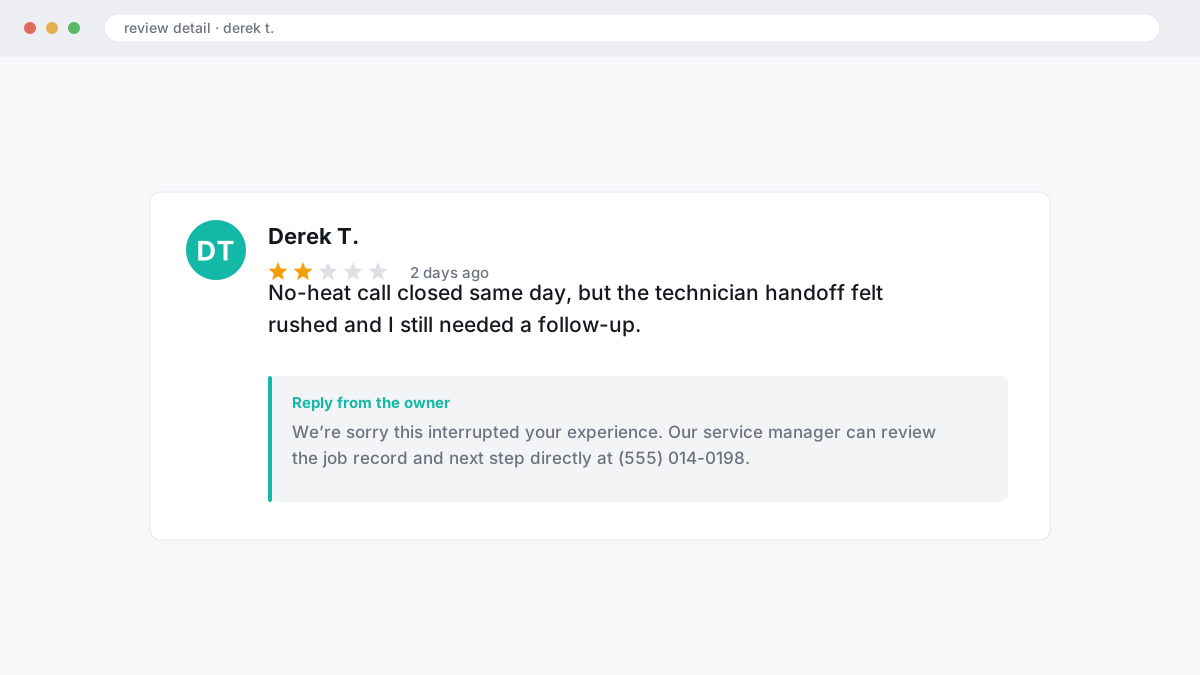
Freeze the affected job record in your CRM or dispatch board and leave every other completed job on its normal path: job marked complete, trigger fired, SMS sent, 48-hour follow-up if no review lands. One bad review does not mean your whole request sequence is broken. Shutting everything down usually costs you more good reviews than the single complaint ever did, especially when completed tune-ups, installs and no-heat calls are still closing the same day.
Reply within 24 to 72 hours. Use facts, show empathy, and give one clear next step with a direct contact method such as your service manager email or phone number. Keep the reply clean enough to satisfy the public reader and specific enough to help the customer move the issue offline; that approach fits Google Business Profile review policy and avoids the defensive essays that make the thread worse.
If the review looks fake, abusive or posted against the wrong job, collect the invoice, dispatch notes, technician name and call recording reference before anyone edits the record.
How fake HVAC reviews are flagged and removed
Fake HVAC reviews are removed by proving a policy breach, not by arguing that the post feels unfair.
Flag reviews that come from people who were never customers, from competitors posing as customers, or from posts that describe work your team could not have done at that address, date or service area. Google reviews are judged against Google Business Profile review policies, so wording like “this ruined my business” carries less weight than hard contradictions. Useful evidence is boring but decisive: invoices, job IDs, dispatch logs, technician notes, call records, and proof that the property sits outside your service area or never booked a visit.
Most failed DIY reports are thin. In BGR Review’s negative-review case file, roughly 90% of businesses that came to us after a rejection had used only the in-platform report button with no supporting documents, and 70–80% of those first requests had been rejected. Speed matters as well: across 12,000+ logged cases, reviews raised within 28 days and backed by a clear policy issue resolved successfully in roughly 90% of cases, while comparable cases raised later fell to approximately 25–30%.
That route still depends on evidence. Google will often refuse a weak file, even when the review is obviously malicious to you.
Choosing HVAC review software or managed help
Choosing HVAC review software comes down to four checks: can it read your dispatch status, send the correct Google review link, record which technician asked, and control reminders so the same customer does not get chased for days.
| What to compare | Software | Managed help |
|---|---|---|
| Dispatch integration | Best option if it connects to your CRM or field-service stack and fires when a job is marked complete. | Useful when your setup is messy and someone needs to map the trigger, template and follow-up logic for you. |
| Google link handling | Check that it uses your direct Google review URL, not a generic landing page that adds friction. | Good if you run multiple locations and need the right link matched to each branch every time. |
| Technician attribution | Look for tags by tech, job type and office so you can see who gets reviews after installs versus repairs. | Better if you also want scripts, coaching and monitoring when a technician-triggered ask goes wrong. |
| Reminder controls | Many tools start on two-digit monthly plans, but the cheap ones often cap reminders or lack stop rules. | Fits operators who need templates, reply handling and escalation when a bad or fake review interrupts the flow. |
If you run one location, software is often enough. If you run several, managed support is usually the cleaner buy because somebody owns the templates, monitoring and escalation path.
A practical 30-day rollout plan for an HVAC review system
A 30-day HVAC review rollout means setting one closed-job trigger, one technician script, and one callback rule so every finished job gets the same review request sequence without daily chasing.
| Period | What you set up | What you check |
|---|---|---|
| Week 1 | Build your Google review link, write one SMS and one email template, confirm opt-in permissions, and map the automation rule: job marked complete in your CRM or dispatch board, trigger fires, first SMS goes out. | Make sure cancelled, warranty-only and duplicate work orders are excluded before anything sends. |
| Week 2 | Train technicians to ask in person before the message lands, then test the workflow in one branch or with one dispatcher. | Review failed sends every day. Fix bad mobile numbers, missing job-close tags and messages blocked by carrier formatting. |
| Weeks 3-4 | Expand to the full team, keep the 48-hour follow-up for non-responders, and add a manual save attempt after a positive callback. | Watch review velocity by technician and job type. |
Keep the first month narrow. If your first branch cannot close jobs cleanly and trigger the two-step follow-up on time, adding more locations just multiplies the errors. If you want managed help instead of building it yourself, BGR Review's review packages include a 30-day free replacement guarantee.
Where to go from here
Start with one channel, one script and one trigger tied to completed jobs. For most HVAC firms, that means a single SMS sent when dispatch or your CRM marks the job complete, using the same technician handoff line every time and a second follow-up 48 hours later if no review comes in. Keep it simple for 30 days. You need a clean baseline before you add email, QR cards or any other layer.
If review growth is stalled after that, or a run of negative reviews is cutting into booked calls from your Google Business Profile, move to a proper reputation management setup. The next action is practical: map your job completion point, write the exact request script, connect the trigger, and decide who handles save attempts when a happy customer calls back instead of leaving a review.
Expect tighter follow-up, cleaner technician handoff, and fewer missed review opportunities.