

Quick answer
Google reviews can go live without changing your visible star score because Google has not refreshed the public rating yet, the review was excluded from rating calculations by its spam and policy systems, the review landed on a duplicate Business Profile, or the underlying average changed too little to alter the rounded score Google shows to one decimal place. A new 5-star or 1-star review can be real and still leave the number unchanged on-screen. If nothing moves after several days, check the review URL, profile CID, duplicate listings and policy status before you contact support.
We handle Google review disputes, duplicate profile checks and negative review removals every day at BGR Review, so this page is built from live workflows rather than recycled help-centre summaries. The first checks we use are simple and mechanical: open the review URL directly, confirm the Business Profile CID, compare the owner view with the public view, then see whether the review sits on the wrong listing.
If you are searching for why google reviews not affecting rating keeps happening, that sequence usually tells you whether you are dealing with lag, filtering or a profile mismatch before you waste time in support. Where removal is the right route, our model is pay after success at $449 per removed review link with $0 upfront, but plenty of cases are cheaper to diagnose yourself first.
How Google’s public star rating is actually calculated
Google’s public star rating is a rounded average from 1.0 to 5.0, so the number you see is a display value rather than a live readout where every new score changes the visible rating by the same amount. Google takes the reviews attached to that Business Profile and shows an aggregate score, then rounds what appears in Search and Maps. At BGR Review, this is the first maths check we make before telling a client whether a fresh Google review should have moved the public number at all.
A single new 5-star review often does nothing visible because rounding hides small changes. If your profile sits at a true average of 4.36, Google can still display 4.4; add one more 5-star review and the underlying average might rise to 4.39, which still rounds to 4.4. That looks broken if you are watching each new review land, especially when review delivery starts within 24-48 hours and the expectation is an instant lift.
Search and Maps usually pull the same profile rating, but short-lived formatting differences do happen. One surface may show 4.4 while another briefly shows 4.5, or one may update the review count first and the star display second. Before you treat that as a profile problem, treat it as a display problem: same listing, same average, different interface timing.
When a new review is too small to move the displayed number
A published Google review can leave your visible score unchanged because Google shows a rounded public rating, and a small shift in the underlying average may not cross the next displayed tenth. If your profile sits at 4.44, one new 5-star review can still leave the public display at 4.4 even though the true average has improved slightly. The maths cuts both ways: a profile with 12 reviews can swing fast from one low score, while a profile with 312 reviews barely moves because each new rating carries less weight in the average.
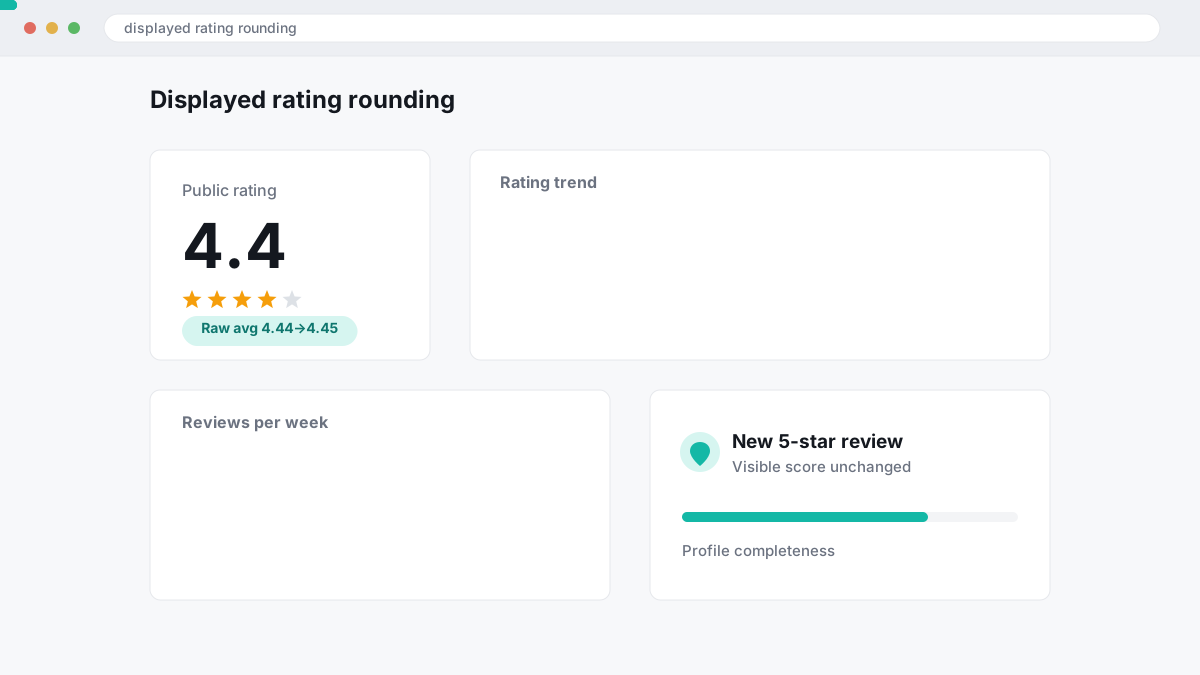
If you are checking this for your own listing, calculate the raw average before assuming Google has ignored the review. That is the same first pass our team uses before recommending any paid step, whether that is a Google review package with a 30-day free replacement guarantee or a removal case billed only after success at $449 per removed link with $0 upfront. In plain terms, low volume makes every star louder, high volume makes every new review weaker, and rounding can hide both effects from the public number.
Where rating updates lag across Search, Maps and devices
Google’s visible star rating can update at different times across Google Search, Google Maps and different devices, so a delay on one screen does not mean the rating calculation is wrong.
You can see the new average on a phone within a few hours and still see the old one in desktop Search, or the reverse. Google does not present every Business Profile surface from the same cached view at the same moment, and signed-in owner view can differ from what the public sees. Before you assume your Google reviews are not affecting the rating, check three places: a signed-out desktop browser, the Maps app on mobile, and a second device on a different network.
At BGR Review, the first check in our workflow is display consistency, because support will usually push you back to basic verification if you skip it. Take screenshots from Search and Maps on the same day, note the time, and record whether you were signed in. If all three surfaces still show the old rating after 24-48 hours, move to a deeper diagnosis instead of waiting blindly.
Published reviews that appear live but carry limited rating impact
A published Google review can stay visible on your Business Profile while contributing little, or nothing, to the public star rating. Google runs spam and fake-engagement checks beyond the moment of posting, so “live” does not always mean “fully counted”. This sits alongside the Google Business Profile review policy and Google’s broader spam systems, which can reassess content after publication rather than removing it instantly.
Most guides miss the weighting point. Google can limit a review’s influence before it disappears, especially when the account, posting pattern or review text trips low-quality signals.
Policy enforcement can also change later. A review may lose weight after an edit, after another user reports it, or after Google reviews the author account for suspicious activity. If you are tracking a stalled rating, save the review URL, posting date and screenshots from Search and Maps on the same day, because later enforcement often rewrites the timeline you thought you were looking at.
How Google’s review filters and policy systems affect star ratings
Google’s review filters can let a review appear live while still limiting, delaying or later stripping its effect on your public star rating if the content or posting pattern trips Google Business Profile policy checks.
Google’s Business Profile policies ban spam, conflicts of interest, review gating and incentivised reviews. That matters because a posted review is not automatically a fully trusted rating input. Reviews from staff, former staff, agencies posting on behalf of clients, or customers who were screened before being asked to leave feedback can fall into conflict or gating territory under Google’s Business Profile review policy and prohibited and restricted content rules. If you use any review service, including BGR Review’s Google review packages with a 30-day free replacement guarantee, the review still has to comply with Google’s own rules or it can lose weight.
A same-day cluster can also trigger extra scrutiny. Ten reviews landing within a few hours from accounts created recently, sharing one location signal or matching device and IP patterns, often draw more filtering than ten reviews spread across normal trading days. Google does not publish the exact threshold, so anyone promising a safe fixed volume is guessing.
The practical check is simple: compare the review text, reviewer profiles and posting times against Google Business Profile Help and Google’s review policies. If the wording looks templated, the accounts look connected, or the ask involved a discount, gift or selective invite, the rating movement can stall even before Google removes anything publicly.
Edits, owner responses and account-level changes that confuse the timeline
Owner replies, review text edits and recent account changes can make the timeline look broken, but they do not all affect your visible star average on Google Business Profile.
An owner response sits underneath the review and does not change the 1-5 score that feeds the public rating. A reviewer can also edit wording, dates or photos while leaving the original star score untouched, so the review looks “updated” even though the average has not moved. Google’s review systems and Google Business Profile Help treat the star value and the written content as separate fields.
If your profile was suspended, reinstated or heavily edited, public display states can lag for a while across Search and Maps. That often shows up as owner view versus public view mismatches. Before you assume a rating problem, save the review URL, the profile CID and screenshots from both views.
Duplicate, merged and misassigned Business Profiles that split review signals
Duplicate or merged Google Business Profiles can split review signals between two listing records, so your visible star rating stays flat even though a new review is live somewhere under the brand.
If Google has two profiles for the same business, each profile keeps its own review count, star average and profile identifier until Google fully merges or removes one. The common trouble spots are service-area businesses that once had a visible address, and moved locations where the old profile was never marked moved and still ranks for branded searches. Check the public profile URL, the map pin and the CID on each listing, because reviews posted to the wrong profile will not help the listing you are watching.
Merged profiles usually do not consolidate instantly. Google can take several days to roll counts, stars and old review placement into one surviving profile, and during that window you can see different numbers in Search and Maps. The messy version is when the old location keeps a few legacy reviews while the main listing shows the newer ones.
If you buy review support or removal help from any provider, including BGR Review, fix the profile structure first.
Profile-level states that can suppress normal rating behavior
A Google Business Profile can stay publicly visible while internal profile states suppress normal rating behaviour. A soft suspension is the clearest example: your listing may still show on Search or Maps, but owner controls, edits and rating updates can behave inconsistently until Google clears the state. Google ties these cases to its Business Profile content and quality rules, and reinstatement after a policy-based suspension often runs in stages rather than one instant fix.
If you changed your primary category, edited the address, lost verification, or triggered a re-verification request, treat the rating issue as a profile-status problem first. Those edits can coincide with review count mismatches, delayed star recalculation, or an owner view that does not match the public view. The practical check is simple: confirm the profile is verified, confirm the address and category now match the live public listing, then review any suspension or reinstatement emails before you chase individual reviews.
Reinstatement rarely ends with the first form submission. Google may ask for fresh proof of trading location, signage, utility bills or business registration, then restore visibility before all management functions settle. If the profile still behaves oddly after that, gather the profile URL, CID, screenshots and support case IDs before escalating. That is the same evidence pack BGR Review asks for when a rating problem sits alongside review removal or duplicate-profile issues.
What happens after a review is removed, edited or no longer counted
After a Google review is removed, edited or excluded from scoring, the review count and visible star rating can update on different clocks. Google can drop the count first, while Search or Maps still shows a cached rating for hours or, in some cases, a day or two. That mismatch is common after a policy action under the Google Business Profile review policy, and it is one reason a profile can look wrong even though the review link is already gone.
Google also recalculates averages after removals, not only after fresh reviews land. If a policy-violating review disappears, the underlying average changes again, but the rounded public number may stay put. A deleted 1-star review does not always lift a displayed 4.3, because the true score might move from 4.26 to 4.34 and still round to 4.3 until another counted review shifts it further.
This is where owners misread the result. Check the public profile count, the individual review URL, and the rating on both Search and Maps before assuming Google ignored the removal.
A practical fault tree for diagnosing why the rating did not move
A fault tree for a stalled Google rating starts by proving the review belongs to the exact Business Profile that should receive its stars, then checking whether Google has simply not synced the public number everywhere yet, then ruling out profile-level issues such as duplicates, merges, suspensions or old removals.
-
Confirm the review sits on the correct profile and location. Open the review itself, check the business name, address and map pin, then compare the profile CID if you manage more than one branch. A review posted to the right brand but the wrong location will publish normally and still leave the rating you care about unchanged. In our own review-delivery checks, this is the first thing we verify before touching anything else.
-
Compare what Google shows in Search, Maps and a signed-out browser for 24-72 hours. Owner view can differ from public view, and desktop Search can lag behind Maps or mobile results for a short window. If the review is visible in one surface but the star average has not matched across all three after 72 hours, stop assuming it is a simple delay.
-
Check for duplicate listings, recent suspensions, merges and removed-review history. A merged profile can keep an old CID, a duplicate can split review signals, and a reinstated listing can take time to reconcile counts and stars. If you also had reviews removed recently, Google may still be recalculating which ratings count before the public average settles; that is the point where we tell clients to collect evidence before escalating, not keep refreshing the page.
What evidence to gather before contacting Google support
A support-ready evidence pack is a single document that shows Google exactly which profile, which review and which public surfaces failed to update, with timestamps that lock the sequence down.
Start with the business profile URL and the profile CID, because support can misread a name-based search if duplicate listings exist. Add full-page screenshots of the rating and review count before the new review appeared and after it appeared, then record the date, time and timezone for each capture. Include the reviewer’s public review link, not just a cropped image of the text, plus the visible star rating on the review itself.
Google support moves faster when you show the mismatch precisely. Note the exact before-and-after review counts, the displayed star rating, and where you checked it: Maps desktop, Google Search desktop, Maps app or mobile browser. If a duplicate or merged profile is involved, paste every profile URL you found, any known merge history, and a short policy-safe explanation such as “review count increased on duplicate profile A while primary profile B star display did not update.”
Keep it in one file.
When the issue needs Google support or a reputation specialist
You should escalate to Google support if you have finished the basic checks and the public rating still has not changed after 72 hours. That threshold is sensible for duplicate listings, merged Business Profiles, suspended profiles and reviews attached to the wrong profile, because those problems sit inside Google Business Profile systems rather than your review strategy. Use the evidence pack from the previous step and point support to the exact profile CID, review URL and screenshot set.
A reputation specialist is useful when the rating issue overlaps with a policy dispute, a false factual claim that may raise defamation questions, or a multi-profile cleanup across locations. Platform rules and legal standards vary by country and by review site, so this is general information, not legal advice; Google Business Profile review policy, the US FTC rules on endorsements and UK consumer-protection rules can all matter.
Where to go from here
Start with the maths. A new review can publish and still leave your visible star rating unchanged because Google does not always move the displayed average on every added rating, especially on profiles with a larger review base or after removed reviews have altered the weighting. Check the public view first, then compare it with what you see inside your Google Business Profile dashboard. If the numbers do not line up, move straight to filtering checks and duplicate-profile checks.
Give it a few days before you escalate. In live review work, the useful evidence is simple: the review URL, the exact profile link, the profile CID if you have it, screenshots of owner view versus public view, and links to any duplicate listings that may be splitting reviews between profiles. That evidence usually decides whether Google support treats this as a display lag, a policy filter, or a profile-merge problem.
Your next action is to build that evidence pack now and then raise it with Google Business Profile support. Expect a wait, follow-up questions, and no guarantee that Google will change the rating if the issue is policy-based.