


Quick answer
Google Business Profile optimisation means fixing the profile elements that change local pack visibility and lead conversion first: primary category, NAP accuracy, reviews, services, photos, Q&A, posts and booking or call paths. The profile is free, but the work is uneven, and generic guides get this wrong. Start with category fit, correct contact details and active review management, then improve service entries, media and conversion tracking. Google caps the business description at 750 characters, so wasted copy costs clicks. If suggested edits keep landing or suspension risk is rising, pause bulk changes and check Google Business Profile guidelines before editing again.
We work on review growth, false review disputes, category corrections and profile-cleanup problems around Google every week, so this guide follows the order that moves clicks, calls and bookings first. The operational reality is simple: a bad primary category can suppress relevance for weeks, a harmful suggested edit can overwrite your opening hours or phone number without warning, and a single in-platform review flag with no evidence usually stalls.
BGR Review sells verified review services and negative review removal, so the commercial angle is obvious; the useful part for you is the process detail. On removal work, we charge $0 upfront and $449 per removed review link after success, and the same evidence discipline matters for your own Google Business Profile fixes: screenshots, business registration details, storefront proof, service-area proof and a dated change log beat guesswork every time.
What should you fix first on a Google Business Profile if you need more leads, not more busywork?
Fix your primary category, then your review flow, service list, and conversion tracking before you touch lower-value cosmetics. That order usually lifts relevance, trust, and lead capture faster than spending hours on photos, posts, or minor wording edits.
Most guides treat every field on a Google Business Profile as equal. That fails because Google and the searcher do not use the profile in an equal order. If your category fit is wrong, your local pack rankings weaken on the searches that bring calls, and no amount of nicer images will correct a relevance problem. A plumber filed as “general contractor” or a family lawyer filed as “legal services” usually feels the damage first in call volume, not in aesthetics. That is why BGR Review starts lead-recovery audits with category correction before anything visual.
After category fit, the next fixes are the fields that change whether a click becomes an enquiry: reviews and response rate, complete services, and working booking and call tracking. Reviews shape click-through from the map pack because people compare star rating, recency, and whether the owner replies before they ring. Services matter because they help Google match the profile to intent and help the visitor confirm you do the job. Call tracking matters because without it, you cannot tell whether a category fix or a review push actually produced more calls or bookings.
Leave cosmetic edits until the revenue-linked fields are stable. At BGR Review, we tell clients to recheck performance after 14-28 days, not after every tiny wording change, because minor edits create noise and hide what moved the result. If calls are still flat after that window, revisit category fit first, then review acquisition and response handling, before you spend another hour on cover photos or Google Posts.
How do you optimise a Google Business Profile step by step without missing the fields that affect conversion?
Optimise your Google Business Profile in a fixed order: lock the core business data first, then add conversion assets, then track results weekly. If you edit fields in random order, you create rework and you cannot tell which change lifted map-pack clicks, calls or bookings.
The wrong approach is to bounce between the business description, Google Posts, photos and services whenever you have ten spare minutes. That fails because Google reads category fit, hours, phone, website and service coverage as the base layer of relevance and trust, while your customer reads them as a reason to call or leave. Do one pass on the profile first: set the primary category, add any valid secondary categories, complete services and products, confirm opening hours, use the main local phone number you actually answer, and check the website URL lands on the right page rather than a generic homepage.
After that, add the assets that improve conversion rate before position changes: booking link if you take appointments, product entries if you sell defined offers, recent photos and videos that prove the job or location, and a short business description that states what you do and where you do it. Google Posts sit after that, not before. A fresh post can support click-through rate, but it will not fix a weak service list or missing booking path.
Record a baseline before you touch anything: calls, website clicks, direction requests, bookings from the profile, and current local pack rankings for your main terms. In BGR Review’s dataset of trades businesses with complete enquiry-source data, observed from February to July 2026, 70–80% of calls and bookings came through a Google Business Profile or Yelp listing rather than a website, which is why baseline tracking matters before any edit starts.
Which primary and secondary categories widen visibility, and when do extra categories start diluting relevance?
Your primary category should match the service that brings in the best-fit enquiries, not the broadest label with the biggest search volume. Secondary categories should cover genuine adjacent services only; extra weak-fit categories can blunt relevance, weaken local pack rankings, and make it easier for Google or users to rewrite your profile.
The wrong approach is picking the widest label you can find. A roofing company that sets its primary category to “Contractor” may appear broader on paper, but it gives Google a fuzzier relevance signal than “Roofing contractor”, and fuzzier signals usually mean weaker map-pack visibility for the searches that actually convert. In BGR Review’s dataset of trades businesses with complete enquiry-source data, observed February to July 2026, 70–80% of calls and bookings were attributed to a Google Business Profile or Yelp listing, which is exactly why the primary category needs to reflect the job that drives revenue rather than vanity reach.
The right approach is tighter category control. Google Business Profile Help tells you to use as few categories as possible, and that guidance exists for a reason: secondary categories should support real service lines you already sell, such as “Gutter cleaning service” beside “Roofing contractor”, not every loose variant you could argue for. If category fit is off, fix that before paying for harder clean-up work; at BGR Review, false-review removal is pay-after-success at $449 per removed link with $0 upfront, but the cheaper win is often stopping irrelevant searches from landing on the profile in the first place.
Extra categories start diluting relevance when they describe edge-case work, seasonal work, or services you mention once on the site but do not actively fulfil. That category sprawl also creates edit instability: a loose match invites suggested edits from users, and once Google accepts one, your local pack rankings can wobble until the primary category and secondary categories line up again with your real lead mix.
Where does NAP consistency still break performance even after the profile looks complete?
NAP consistency problems usually sit between your Google Business Profile, your website contact page, major citations, and duplicate listings. Rankings can hold while leads leak, because mismatched phone numbers, addresses, opening hours or service area settings send customers down the wrong route and give Google fresh reasons to accept confusing suggested edits.
Most guides tell you to check the profile and move on. That fails because Google and your customers compare the full business-data trail: the contact page, footer, schema, Apple Maps, Bing Places, Yelp, Facebook, and the branded search results that appear when someone searches your name before calling. If your profile shows one number and your website shows another, trust drops before click-through rate turns into calls or bookings, and a duplicate listing can keep siphoning branded search demand to an old number.
The fix is to verify the trail, not the profile. After any major edit such as a number change, address correction, or service area update, audit your top citations and the first page of branded search results within 30 days, then merge or remove duplicates before they split map-pack signals and conversions.
How do reviews, services, and Q&A work together to turn profile views into enquiries?
People enquire faster when your reviews prove trust, your services explain fit, and your Q&A removes friction before contact. Those three areas usually move calls, bookings and form fills more than posting another update or endlessly tweaking the business description.
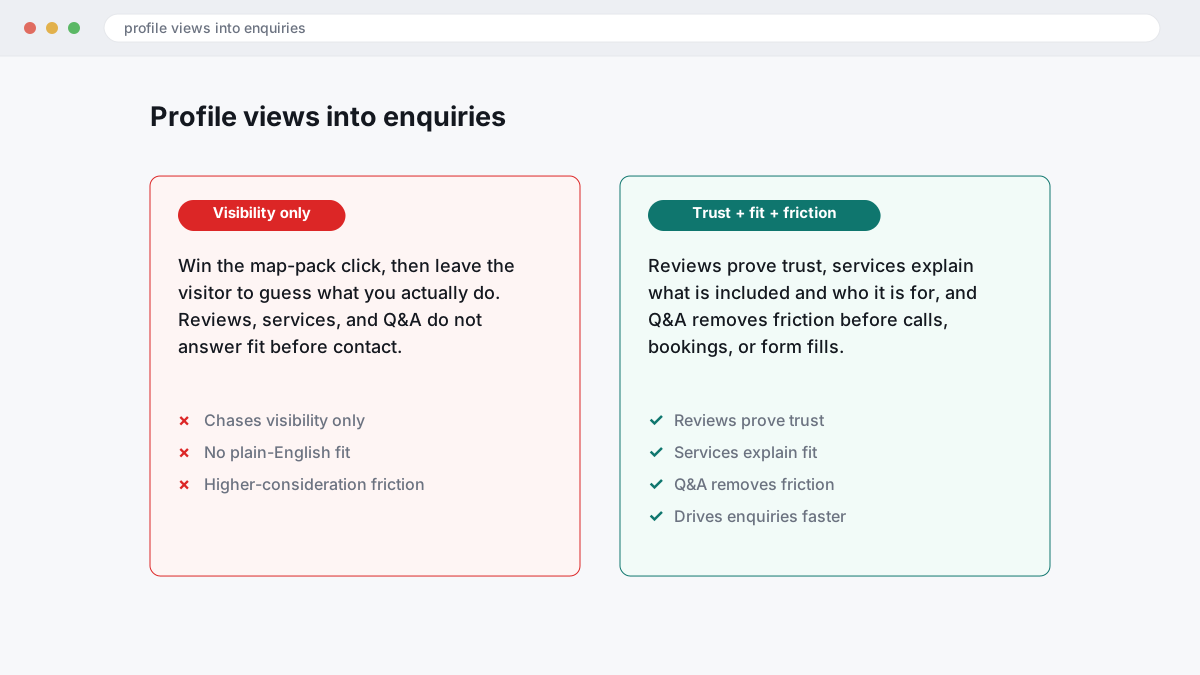
The wrong approach is to chase visibility only, win the map-pack click, and then leave the visitor to guess what you actually do. That fails on higher-consideration services because profile views do not become enquiries unless the services and products area answers the fit question in plain English: what is included, who it is for, and any useful qualifier such as emergency, same-day, commercial, residential, remote or in-person. In BGR Review’s dataset of 1,485 businesses observed February–July 2026, trades firms that shared complete enquiry-source data attributed 70–80% of calls and bookings to a Google Business Profile or Yelp listing, which makes conversion clarity on the profile itself more valuable than another minor wording change elsewhere.
Fresh reviews and response rate do the next job. A profile with recent reviews and owner replies reduces hesitation because the reader can see how you handle delays, pricing questions, missed calls or follow-up issues before they contact you. Generic guides treat replies as housekeeping; in practice, two or three useful owner responses often do more for conversions than another round of Google Posts, especially where the buyer is comparing several providers with similar ratings.
If you are getting the same pre-sale question after hours, put it in the Q&A section before it costs you another lead. Pre-written questions about service areas, turnaround times, insurance, parking, payment methods or whether quotes are free help a visitor self-qualify without waiting for your team, which supports after-hours bookings and next-morning calls. Keep these answers short and specific, because vague Q&A copy creates the same drop-off as a thin services list: the click happened, but the enquiry never did.
How do you stop spam edits and suggested edits from rewriting your profile behind your back?
Stop edit drift by checking the fields Google and users can change most often: business name, primary category, hours, phone number, website URL and address details. Fast detection matters because one bad live edit can cut calls, weaken local pack visibility and send ready-to-book leads to the wrong number before you spot it.
Most guides treat Google-approved edits as trustworthy. That fails because spam edits and suggested edits can come from users, data partners or automated confidence signals, and Google can publish them without asking you first. A changed category can blunt relevance, a swapped URL can hurt conversions, and a bad phone number can break call tracking the same day.
Treat every public-facing field as vulnerable to drift or sabotage. Check name, category, hours, phone and URL every week, and review the Q&A section at the same time because competitors and random users can plant misleading answers there that depress click-through rate even when your star rating stays strong.
Document the damage before you revert anything. Take dated screenshots of the live profile, the incorrect field, the correct field in your records, and any ranking or call-impact notes; support requests often stall when the only evidence is “someone changed it”. If repeated reversions keep failing, move to escalation with a clean evidence pack rather than toggling the field back again. If you want outside help, BGR Review handles this kind of profile-control work, but a weekly manual check is still the cheapest fix when the issue is just edit drift.
Which guideline violations most often trigger suspension after aggressive optimisation?
Most suspensions follow edits that break eligibility or representation rules, not harmless polishing. The highest-risk changes are keyword-stuffed business names, unsupported addresses, duplicate listings, and categories or services that describe work you do not actually offer under Google Business Profile eligibility and business representation rules.
Most guides treat suspension triggers as obvious spam. What actually gets profiles pulled into reverification or removal is routine-seeming “optimisation”: adding city terms to the name, switching a home-based listing to a virtual office, widening service area settings to places you do not realistically serve, or creating a second profile because the first one ranks badly. Those edits fail because Google checks whether the profile represents a real, eligible business presence, not whether the wording sounds good for local pack rankings.
The safer approach is dull and precise: keep the trading name exactly as used offline, use an address only if staff can genuinely receive customers there during stated hours, and use service-area mode if you travel to clients. If you already have a profile, fix the original rather than cloning it.
Rules also change by country and platform. In the US, undisclosed paid endorsements can breach the FTC’s rule on fake reviews and testimonials; in the UK and EU, consumer-protection rules against misleading commercial practices and fake reviews are stricter; and defamation turns on false statements of fact, which is a separate issue from Google suspension. This is general information, not legal advice.
What actually helps recover a suspended Google Business Profile once visibility disappears?
Recovery starts by fixing the trigger, proving eligibility, and filing one clean appeal with matching documents. Rushed appeals fail when your business name, address, category, or ownership trail still conflicts between Google, your website, and other citations.
Most guides tell you to appeal immediately after visibility drops. That fails because Google checks the evidence trail behind common suspension triggers: unsupported name edits, category changes that overstate what you do, address changes without matching proof, or NAP consistency problems across the profile, website footer, Companies House or state records, and directory listings. Remove any unsupported edits first, then check whether a suggested edit has changed your name, service area settings, opening hours, or map pin before you touch reverification.
The appeal works better when every document says the same thing. Build a pack with business registration, external signage showing the trading name, a recent utility bill for the operating address, and website proof that repeats the same name, address, phone number, and services shown on the profile. If support sees “Suite 4” on the utility bill, “Unit 4” on the site, and no signage photo, the case usually stalls in review rather than moving to reinstatement.
Timelines depend more on evidence quality than on how fast you submit. Clean files can move in days; messy files often sit for weeks, especially after multiple failed appeals or ownership conflicts.
How should multi-location brands optimise without creating duplicate, overlapping, or self-competing profiles?
Multi-location Google Business Profile optimisation works when each listing matches a real, eligible branch with its own data, tracking and local proof. Copying one winning profile across every city, setting overlapping service area settings, and reusing the same main phone number often creates duplication, local pack cannibalisation and verification trouble under Google Business Profile guidelines.
Clone-and-scale fails because Google needs a reason to rank each branch for its own market. If three locations share the same primary category mix, near-identical services, the same booking URL and one blended call line, your click-through rate and conversions usually blur together, and the nearest listing can outrank the one you actually want. Give each eligible location its own category set where the offering truly differs, its own services list, a location landing page with local staff, jobs, reviews or photos, and branch-level booking and call tracking so you can see which profile produced the enquiry.
Address settings cause more damage than most chains expect. Hide the address only if that branch is a true service-area business with no staffed, customer-facing premises; if customers can visit during stated hours, publish the address and keep the service area settings tight enough to reflect where that team really works.
When does a Google Business Profile management service beat DIY, and what are you really paying to avoid?
A managed service usually beats DIY when your profile changes often, lead attribution affects staffing, or suspension and spam risk can cut off enquiries. What you are paying to avoid is not basic data entry; at BGR Review, the paid work usually centres on monitoring, escalation handling, prioritising fixes, and protecting map-pack visibility before lost calls and bookings turn into a larger problem.
Comparing providers on monthly fee alone gives you the wrong answer because the cheap option often excludes the work that breaks in real life: spam edits and suggested edits, review disputes, response-rate management, and call tracking checks when attribution goes wrong.
This is the comparison that matters before price.
| Area | DIY | Managed service |
|---|---|---|
| Monthly scope | Updates happen when someone remembers | Set ownership for profile edits, reviews and response rate |
| Escalation handling | Usually limited to the in-profile report button | Evidence pack, support follow-up, and platform-specific routing |
| Reporting | Rank checks with weak lead attribution | Booking and call tracking tied back to profile changes |
If you run one stable location and can check the profile weekly, DIY is often enough. If you run several locations, need clean governance, or cannot afford a bad edit, missed review response, or suspension to sit unresolved, service wins because recovery capability matters more than admin time.
What should a repeatable Google Business Profile audit checklist include each month?
A monthly audit only helps if one sheet tracks accuracy, relevance, conversion assets, edit control and measurement together. If it cannot show what changed, who changed it and what happened next over 8-12 weeks, it is admin, not an operating tool.
The wrong approach is a static tick-box audit where every field looks equal. That fails because lead loss usually starts in the fields closest to conversion: primary category fit, hours, phone, website URL, services, and any booking link or call tracking setup. Check those first, because a wrong category hurts local pack relevance, and a broken booking path or misrouted tracking number cuts calls and bookings even when map-pack click-through stays healthy.
Use this order in the sheet so the fixes match lead impact.
| Priority | What to check | What to log |
|---|---|---|
| First | Categories, hours, phone, URL, services, booking link, call tracking | Exact edit, date, owner, calls/clicks/bookings after change |
| Second | Business description, photos and videos, Q&A, products, Google Posts, duplicate listings | Visibility change, branded search lift, profile stability issues |
The right approach is a live change log. Record every edit date, who made it, whether Google accepted or rewrote it, and what happened to calls, direction requests, booking completions and website clicks for the next 8-12 weeks. That is how you separate a useful business description update from a harmless one, spot duplicate listings before they split reviews, and see whether fresh photos and videos or Google Posts improved conversions or just kept the profile busy.
If you use outside help, ask for this log in the handover. If an agency, freelancer or BGR Review cannot show change ownership and outcome, you cannot tell optimisation from drift.
Where to go from here
Your Google Business Profile works like a revenue asset when you manage it weekly, the same way you would a paid channel or sales pipeline. Start with the fields that change lead flow fastest: primary category, services, review quality and response rate, booking and call tracking, then check for harmful suggested edits, service area drift and duplicate listings that can suppress local pack visibility and waste clicks. Generic guides treat every field as equal. They are not.
Your next step is simple: open the profile, compare the live listing against your real offer, and make one fix list in priority order for this week. If category fit is wrong, reviews are stale, or calls cannot be traced back to the profile, fix those before you spend time on Google Posts or extra photos. Expect cleaner click-through from the map pack first, then better conversions from calls, bookings and form fills once the profile matches what searchers see.
If false reviews, rejected flags or recurring edit issues are blocking progress, specialist help is usually faster than repeating the in-platform report button.