


Quick answer
A Google Business Profile suspension usually means the listing still exists, but Google has stripped visibility or editing control until it reviews a reinstatement request; a disabled state usually means access to the profile or account is blocked more completely. Check the exact status message in your dashboard first, because the evidence pack changes by status. Google decides reinstatement on guideline compliance and document match, not on a long explanation. File one clean appeal with matching business details, then stop editing. Repeated pre-appeal changes often weaken the case instead of helping it.
This guide to Google Business Profile disabled vs. suspended comes from live reputation and listing recovery work, where the outcome often turns on small details: whether the legal business name on the utility bill matches the storefront photo, whether a service area business hid its address correctly, and whether someone kept editing categories after the flag. Those are the points that decide whether Google reviews the file or leaves it stuck.
BGR Review handles review and reputation issues for 15,000+ businesses and 1,240+ verified clients from New York, London and Thornhill, and we sell both review growth and negative review removal. On removals, our model is simple: $0 upfront and $449 per removed review link after success. On disabled and suspended GBP cases, the same rule matters first: submit the right proof in the right order, once.
Which status do you actually have: disabled access, soft suspension, or hard suspension?
A disabled login, a soft suspension, and a hard suspension are different problems. The fastest route is to match the exact Google Business Profile status message to visibility in Search and Maps, your access level, and the profile’s verification state before you change anything.
The wrong move is to treat every warning as a suspension and rush into edits or a reinstatement request. That fails because disabled account access usually sits at the Google account or permission level, while a soft suspension usually leaves the listing live in the local pack or map pack but removes owner controls, and a hard suspension usually pulls the profile out of Search and Maps until Google approves a reinstatement request. Google surfaces those states in different places, so you need to compare what you see inside Search, Maps, and Business Profile Manager rather than relying on one screen.
This is the quickest way to sort the status before you touch the listing.
| What you see | What it usually means | What to check first |
|---|---|---|
| You cannot get into the profile, or your Google account has lost access | Disabled account access or a permissions problem | Whether the listing is still live in Maps and whether another owner remains attached |
| The profile still appears publicly, but you cannot manage edits, posts, or some fields | Soft suspension | Live visibility, verification badge, and recent profile edits |
| The listing no longer appears publicly for branded searches or map queries | Hard suspension | Public visibility first, then reinstatement route inside Business Profile Manager |
The right approach is dull but effective: capture the message, search the brand name in Google Search and Maps while logged out, then confirm who still has owner access. Across negative review cases with prior self-filed attempts logged by BGR Review from June 2025 to June 2026, roughly 90% had relied on the basic in-platform button with no supporting documentation, and 70–80% of those first requests were rejected. Filing the wrong route early weakens the next step because Google now has a thin, mismatched record before you submit the evidence that actually fits the status.
Why does the label matter before you touch the listing?
The label matters because Google routes different problems through different queues. Lost account access needs ownership and login proof; a suspension needs guideline-safe profile edits before appeal and business evidence, and mixing those paths usually slows the appeal timeline.
The common mistake is filing one generic reinstatement request with every document you have. That fails because Google is checking a different question in each status: who controls the profile, whether the listing still shows publicly, and whether the business meets Google Business Profile guidelines. In BGR Review's dataset of negative review cases with prior self-filed attempts, logged June 2025 to June 2026, roughly 90% had used only the basic in-platform report flow and 70-80% of those first attempts had been rejected; a thin first submission often creates delay, not clarity.
This table keeps the first move clean and stops you sending the wrong proof first.
| Status | What Google is checking | Best first action |
|---|---|---|
| Disabled account access | Ownership, email access, manager/admin history | Recover account access first; do not file a suspension appeal with utility bills |
| Soft suspension | Guideline compliance while the profile still exists | Freeze risky edits, document the live business, then file a reinstatement request |
| Hard suspension | Whether the listing itself is eligible to return | Stop all changes, fix duplicate or ineligible elements offline, submit evidence that matches the legal business |
The right approach is dull but effective: identify the status message, stop last-minute edits, then submit only the evidence that answers that status. Changing your name, category, address or service area minutes before appeal can make the review look like a moving target, which is why the cleanest queue usually starts with a frozen profile and matched documents.
What usually triggers a Google Business Profile suspension in the first place?
Most Google Business Profile suspensions come from a mismatch with the guidelines, not a random penalty. The repeat triggers are business-name edits, address eligibility problems, duplicate or ineligible listings, virtual offices, and category or ownership changes that break Google's rules on representation.
The wrong reaction is to assume Google acted for no reason and keep editing until something sticks. That fails because the Google Business Profile guidelines for representing your business on Google focus on three things first: eligibility, accurate representation, and prohibited content, so a recent change usually leaves a trail. A plumber who adds “Emergency 24/7 Best Plumber London” to the business name, a service-area business that starts showing a staffed address it does not actually use, or a practice that leaves an old practitioner listing live beside the main profile has given Google a clean policy reason to suspend.
Bulk changes create another problem. In multi-location governance, one policy-sensitive spreadsheet edit across a group of locations can trigger review after a single bad field is copied everywhere, especially name formatting, categories, phone swaps, or location moves. The right approach is to trace the last meaningful change, compare every field against the guideline language, and check for duplicates before you think about reinstatement. If you bring this to BGR Review, that is where the audit starts, because fixing the wrong cause delays your return to the map pack, branded search clicks, and booked calls.
Which edits should you stop making before you file any appeal?
Stop editing first. Name, category, address, or service-area changes made right before an appeal turn your Google Business Profile into a moving target, and your documents can stop matching the listing in the same review cycle.
The wrong move is to keep tweaking the profile until it looks cleaner. That fails because profile edits before appeal can trigger another policy check under Google Business Profile guidelines, especially if you change the business name, primary category, street address, or service-area settings while Google is already reviewing legitimacy. Your first job is simpler: freeze those fields, then capture the current state with dated screenshots of the status message, info tab, categories, address or hidden service area, hours, and any recent edits shown in the dashboard.
Only fix a factual error you can prove immediately with matching documents. If your legal business name, registered address, signage, utility bill, or website header all show the same NAP consistency, correct the listing once and leave it alone; if the proof is mixed, wait and build the evidence pack first. Across 12,000+ negative review cases logged by BGR Review from June 2025 to June 2026, roughly 90% of businesses who came to us after a failed first attempt had used only the basic in-platform report flow with little supporting evidence, and 70–80% of those first requests had been rejected. A stable record shortens the appeal timeline because Google reviews one version of the profile, not three conflicting ones.
What belongs in a reinstatement evidence pack that Google can verify quickly?
A reinstatement evidence pack should prove three things fast: your business exists, it is eligible for a Google Business Profile, and the listing matches your real-world details exactly. The core set is usually a business licence or registration, a utility bill, website contact details, and current photos showing the location or active operations.
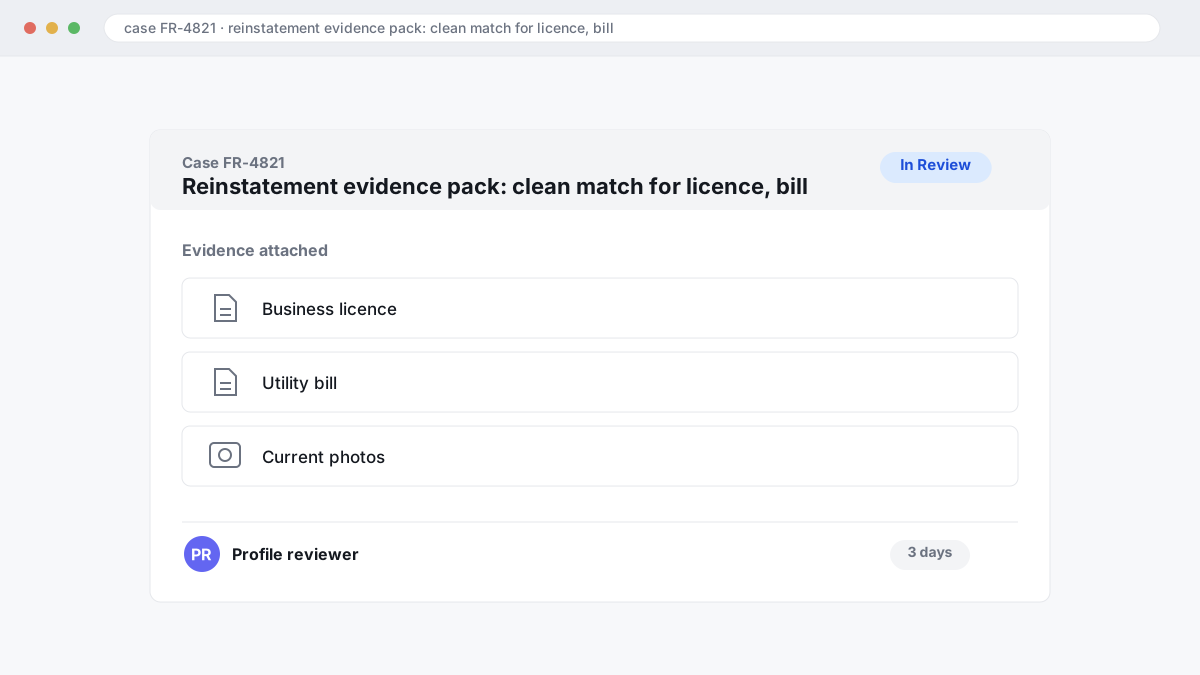
Most guides tell you to upload everything you can find. That fails because the reviewer is checking for a clean match, not reading a case story. If the business licence shows one name, the utility bill shows another, and the website uses a different address format, your NAP consistency breaks before Google gets to the rest. In BGR Review's dataset of negative review cases with prior self-filed attempts, logged June 2025 to June 2026, roughly 90% of businesses that came to us after a failed attempt had used only the basic in-platform report button with no supporting documentation, and 70-80% of those initial requests had been rejected. A rejection still does not prove the profile was ineligible, but weak evidence wastes time.
A short checklist works better because reviewers scan submissions. Use documents that match the listing exactly, down to suite number, trading name, and postcode format.
- Business licence or registration showing the same business name as the profile
- Utility bill with the same address shown on the listing
- Website footer or contact page repeating that same name, address, and phone number
- Storefront photos with permanent signage visible from outside
- If you do not serve customers at the address, recent field-service proof such as branded vehicle, equipment at jobs, or worksite photos dated within current operations
Skip the long narrative unless Google asks for clarification. Clear files, recent photos, and exact-match details get checked faster and get your map pack visibility, calls, and bookings moving again sooner than a document dump ever will.
How should service-area businesses prove they are real without showing a public storefront?
Service-area businesses get reinstated by proving real operations, not by pretending to be a shopfront. Google Business Profile guidelines allow a service area business to keep a hidden address, but your evidence pack still has to connect the business to one real operating base.
The wrong move is to invent storefront-style proof: a rented virtual office sign, a coworking reception desk, or staged photos that suggest walk-in trade when you do not serve customers there. That usually fails because Google checks eligibility first. If the listing says customers are served at the address, but your documents and site behaviour point to a home-based business or mobile operation, the reinstatement request starts with a mismatch instead of a verifiable business.
The right move is simpler. Show field operations tied to one eligible base: photos of field staff on jobs, branded vehicles with the business name, tools or inventory stored at the base, invoices, work orders, insurance papers, utility bills, and licence documents that match the business name and address. For a home-based business, the address can stay hidden publicly and still be valid; Google still needs private address proof in the evidence pack, because hidden does not mean unverifiable.
One operational detail matters here: submit documents that all match the current listing details before you appeal, and avoid adding fresh service areas or category edits at the same time. A clean pack with one base, one name format and real service documents gives Google a faster eligibility check and gets your map pack visibility, calls and booked work back sooner than a pack built around the wrong business model.
Should you handle the reinstatement yourself or use a service?
Handle the appeal yourself if you have one location, clean business documents and a straightforward mismatch to fix. Paid help makes more sense after a failed reinstatement request, where eligibility is arguable, or where several people keep editing the profile and breaking the audit trail.
DIY is cheaper because your direct cost can be zero, but owner time is the real bill. The wrong approach is filing fast, then editing the name, category, address or service area again while the case is open; that usually muddies the appeal timeline and makes Google compare different versions of the same listing. The better approach is slower and cleaner: freeze edits, line up the licence, utility bill and public-facing business details, then submit one consistent reinstatement request with the mismatch explained once.
The myth is that a service can buy faster approval. Google does not sell faster review of a suspension case through third parties. The value is process control: evidence ordered the way support can verify it, change logs checked before submission, and follow-ups handled without creating fresh contradictions. In BGR Review's own case file of 12,000+ negative review cases logged June 2025 to June 2026, roughly 90% of businesses that came to us after a failed self-filed attempt had used only the basic in-platform report button, with no supporting documentation; 70–80% of those initial requests had been rejected. That finding comes from review disputes, not reinstatements, but the same evidence problem shows up in Google profile work.
Multi-location governance is where DIY breaks down fastest. If head office, a franchisee and an agency all touch categories or addresses, paid help often earns its fee by locking one owner, one source of truth and one submission sequence; BGR Review also makes its commercial position plain here, because we sell review and reputation support, while our review-removal work is separate at $449 per removed link with $0 upfront.
Which fix gets leads back fastest after a suspension?
The fastest way to get leads moving again is usually to get the profile live first, then repair the trust signals around it. Reinstatement comes first, NAP consistency comes second, and fresh activity comes third if you want calls and bookings to recover.
The wrong move is to chase new reviews while the listing is still suspended. That fails because a suspended Google Business Profile cannot compete in the local pack or map pack, so extra review velocity does little for click-through rate or conversions until Google restores eligibility. In BGR Review's dataset of 1,485 businesses observed from February to July 2026, trades firms with complete enquiry-source data attributed 70-80% of calls and bookings to a Google Business Profile or Yelp listing, which is why the appeal timeline matters more than any short-term review push.
The right sequence is dull but effective: get the reinstatement request approved, then align your business name, address and phone across the site, directories and any old citations, then restart normal profile activity. NAP consistency gives Google fewer reasons to keep suppressing visibility after approval, especially where a service area business, a changed suite number or an old call-tracking number has muddied the record. Reviews help after that because review recency can lift click-through and conversions once the profile is actually visible again.
Calls often lag behind the approval email. Maps rankings and branded search demand can take time to stabilise, so post-reinstatement monitoring matters: watch calls, direction requests, profile impressions and any silent data changes for the next few weeks, and fix new mismatches before you start spending on review acquisition or ads.
What can you do if Google denies your reinstatement request?
A denial usually means one of two things: your documents did not match the profile, or Google still sees an unresolved guideline issue. The fix is a tighter second reinstatement request built around the exact mismatch Google can verify, not the same pack sent again with a longer story.
Read the denial wording closely. If Google points to missing proof, rebuild around one clean match: legal business name, real-world address if one is eligible to show, phone, website, and ownership evidence that all line up with the listing. If the wording suggests ongoing guideline concerns, look for the actual trigger Google can still see, such as duplicate or ineligible listings, a virtual office, or a category and service-area setup that conflicts with Google Business Profile guidelines. Resending the same appeal usually fails because the reviewer sees the same contradiction in the same review queue.
BGR Review's case file shows the cost of weak resubmissions. Across negative review cases with prior self-filed attempts, roughly 90% of businesses that came to us after a failed try had used only the basic in-platform report button, and 70-80% of those first requests had been rejected; that dataset covers June 2025 to June 2026 and only cases with prior self-filed attempts. A rejection does not prove the listing is ineligible, but a second submission gets weaker when it adds more explanation without better proof.
Escalation depends on what Google can verify and who controls the asset. Owner conflicts, agency-managed access, merged profiles, and policy issues tied to duplicate or ineligible listings need a different record from a simple document mismatch.
How do duplicates, virtual offices, and multi-location changes complicate suspension cases?
Duplicate listings, virtual offices and multi-location changeovers often block reinstatement because Google checks whether one real business maps to one eligible location under the Google Business Profile guidelines, and mismatches here make a suspension look like misrepresentation rather than a simple data error.
Duplicate or merged listings are the first problem to clear. Two profiles for the same business can split reviews, photos and NAP consistency signals, but the bigger issue is representation: Google may see one brand trying to occupy extra map-pack space or claiming an old tenant’s address history. Freeze profile edits before appeal, identify the primary live CID, and gather proof that the other listing is duplicate, moved, or ineligible. Filing a reinstatement request while both versions stay active usually weakens the evidence pack.
Virtual offices and co-working addresses fail more often because eligibility depends on a real, staffed presence during stated hours, not mail handling or occasional room hire. A lease alone rarely fixes that. Google usually wants a public-facing setup it can verify: permanent signage, staff on site, and a location where a customer could reasonably attend during opening hours. Service-area businesses should hide the address if customers are not received there.
Multi-location governance is where single-site habits break down. A chain that changes names, categories, managers and hours across several branches without controls can trigger hard-to-defend conflicts in ownership and location history.
| Issue | Why approval stalls | What to fix first |
|---|---|---|
| Duplicate listing | Conflicting authority and representation concerns | Choose the live profile, document the duplicate, stop parallel edits |
| Virtual office | No verifiable staffed presence | Show permanent occupancy or convert to a compliant service-area setup |
| Multi-location edits | Manager-role sprawl and inconsistent data across branches | Lock roles, centralise change control, submit branch-specific proof |
If you are deciding between DIY cleanup and outside help, use the cheaper route when the issue is a clear duplicate merge or a simple role reset. Bring in support when a denied appeal already exists, several locations changed at once, or the address model itself may be ineligible.
Where to go from here
Start by naming the status you actually have: disabled account access, a soft suspension where the profile still exists but key functions are blocked, or a hard suspension where the listing drops out of Search and Maps. That call decides everything that follows — which Google Business Profile status message matters, which edits to freeze, and whether your reinstatement request needs ownership proof, business legitimacy proof, or both. If you submit the wrong evidence pack first, the appeal timeline stretches and a second submission usually gets weaker, not stronger, because Google sees repeated claims with no new support.
Your next action is simple: stop profile edits, pull the current dashboard message, match your public business name, address, phone and registration documents, then file the appeal route that fits that status. If the suspension sits alongside missing reviews, a duplicate listing, or a wider drop in map pack clicks, calls and bookings, go straight to the relevant Google Business Profile recovery service page rather than treating it as a single-form problem.
You should expect a cleaner submission, fewer wasted appeals, and a clearer answer on whether DIY is still viable.