

Quick answer
To get more google reviews in 2026, ask at the point satisfaction is highest, remove friction, and stay inside Google Business Profile review policy. Send your direct review link or QR code as soon as the job closes or the purchase lands, then send one follow-up in the same channel the customer already used, usually SMS or email. Train staff to make the verbal ask first. Do not offer discounts, cash, gifts or filtered feedback funnels. If review volume stalls, timing, request-channel friction, or weak staff follow-through usually explains it.
This page is written for operators deciding whether to run review requests in-house, add software, or hand the process to a managed service. We work in the overlap between review acquisition and removals, which matters because the same shortcuts that depress response rates also trigger policy problems later.
One detail generic guides miss: the workflow breaks after the job is marked complete more often than at the ask itself. The CRM trigger fires, the link goes out, nobody checks whether the message used the right Google Business Profile URL, and a week later the owner thinks demand is weak when the real problem is a broken path and no manager check on follow-up timing.
Why do most Google review plans stall after the first setup?
Most Google review programmes stall because they push harder on reminders instead of removing friction. The levers that usually decide whether reviews keep coming are ask timing, a direct path to the review form, the right request channel for that customer, and a Google Business Profile that already looks active and trustworthy before the request lands.
Most pages stop at three basics: claim the profile, share a link, tell staff to ask. That setup helps once, then review velocity drops because the process never changes with the customer journey. A Google Business Profile with weak categories, missing services, old photos or no owner responses can still rank for some local SEO terms, but it gets fewer map-pack clicks and gives the customer less confidence to finish the review once they open Maps.
More reminders rarely fix that. Less friction and better timing do. In BGR Review’s dataset of 1,485 businesses observed from February to July 2026, new trades and local service firms typically got first reviews around two weeks after launch; the businesses that kept volume moving had a review ask tied to a real trigger such as job completion or invoice paid, not a generic monthly chase. When a plan stalls despite happy customers, the usual causes are simple: the ask arrives too late, the link opens the wrong screen, or the profile itself looks unattended.
When should you ask so happy customers actually leave a Google review?
Ask when the outcome feels finished, not three days later when the job has already blurred into the rest of the week. The strongest window is straight after job completion, checkout, or confirmed delivery, while satisfaction is still fresh and the customer still remembers the person who helped them.
Most review plans stall because staff send requests when they have admin time. That is the wrong trigger. A Friday batch sent from the office feels convenient to your team, but it lands after the satisfaction peak, and the timing of the ask is what drives whether a customer taps through or ignores it. For service businesses, the best requests usually go out within two hours of the work being signed off. For ecommerce, the cleaner moment is after delivery confirmation, once the order has actually arrived as promised.
A simple workflow works better than reminders sent at random: complete the job, mark it finished in your CRM, send the request link at once, then check the next day whether the customer opened it. If you miss that first window by 24-48 hours, response rates usually soften because the interaction no longer feels current. In BGR Review's dataset of 1,485 businesses observed from February to July 2026, new trades and local service businesses typically saw their first reviews appear around two weeks after launch, which fits a fast, post-completion request cycle rather than a delayed monthly ask.
Which request channel gets the highest Google review completion rate?
SMS usually gets the highest completion because it cuts the path to a posted Google review down to the fewest mobile taps. Email works better for higher-consideration services that need context or account-based follow-up, while printed QR codes help on-site teams only when the customer scans there and then.
Most businesses choose the request channel that is easiest for their staff. That is the wrong test. The channel that suits your admin team often adds friction for the customer, and friction is what kills response rate by channel after the first week, even with a clean Google Business Profile and a proper direct review link.
SMS wins because the customer is already on a phone, the message opens fast, and the link can take them straight into the review screen. A plumber finishing a leak repair, a roofer closing a same-day patch, or a salon confirming payment can ask on the spot and send the link immediately. If you use BGR Review to set up a managed flow, this is usually the first request channel we put in place, then we add a second touch rather than forcing every customer into email.
Email is slower but stronger when the service needed more trust, more paperwork, or more than one decision-maker. Think dentists, accountants, legal firms, web agencies. The message can mention the project, invoice, or adviser name, and you can follow up from the same account 24 hours later.
Printed QR codes help reception desks, vans, menus, and checkout counters, but they underperform once the customer has walked out in a rush. Use QR for in-person prompts, not as your main review engine.
How do you create a Google review link customers can use in one tap?
A usable Google review link opens the review prompt in as few taps as possible. Build the direct review link from each location’s Place ID, shorten it carefully only if you need cleaner print, and test it on iPhone, Android, desktop, and a logged-out browser before anyone sends it.
Most guides tell you to send people to your homepage or tell them to search your business name and find your Google Business Profile. That fails because every extra step adds friction: wrong location, wrong profile, no Google login ready, or the customer gives up before the review box appears. The cleaner setup is one direct review link per branch, generated from that branch’s Place ID, then saved inside your CRM, invoice template, SMS tool, and post-job email. When BGR Review sets up review delivery assets for managed campaigns, this location-by-location prep is part of the first 24-48 hours because a shared company-wide link breaks fast in multi-location accounts.
Print the same link as a QR code on receipts, counters, vans, and invoices, but only after you scan it on real devices. Test the QR code and the raw link on iPhone Safari, Android Chrome, desktop, and one logged-out browser session. If one route opens a profile page instead of the write-a-review prompt, fix it before rollout.
What should your team actually say when asking for a Google review?
The best review request script is short, specific and neutral. Ask for honest feedback, send your direct review link straight away, and avoid any wording that pressures people, filters for happy customers, or offers a reward for leaving feedback.
Most teams over-script this. Staff prompts turn into “If you were happy, could you leave us a 5-star review?” or “Use this only if everything was perfect,” which drifts into review gating and clashes with the Google Business Profile review policy. It also sounds unnatural in every request channel, so staff stop using it after the first week. A short neutral ask works because the customer hears one clear action, gets the link immediately, and knows you want honest feedback rather than a pre-screened rating.
Keep the wording tight enough to say naturally and use the same standard ask for every eligible customer, not only the ones your team expects to rate highly.
- SMS: “Thanks for choosing us today. Could you share honest feedback on Google? It helps other customers find us: [direct review link]”
- Email: “Subject: Quick favour — your feedback. Thanks for working with us. If you have a minute, please leave an honest Google review here: [direct review link]”
- In person: “If you can, please leave us an honest Google review. I’ll text the link now so it’s easy.”
Which review fixes move leads and bookings before you chase more volume?
Fix the review weakness that changes customer choice first: a weak visible rating, stale recency, or a clear review-count gap against nearby rivals. More volume helps, but leads and bookings usually move faster when you close the most obvious trust gap on the profile first.
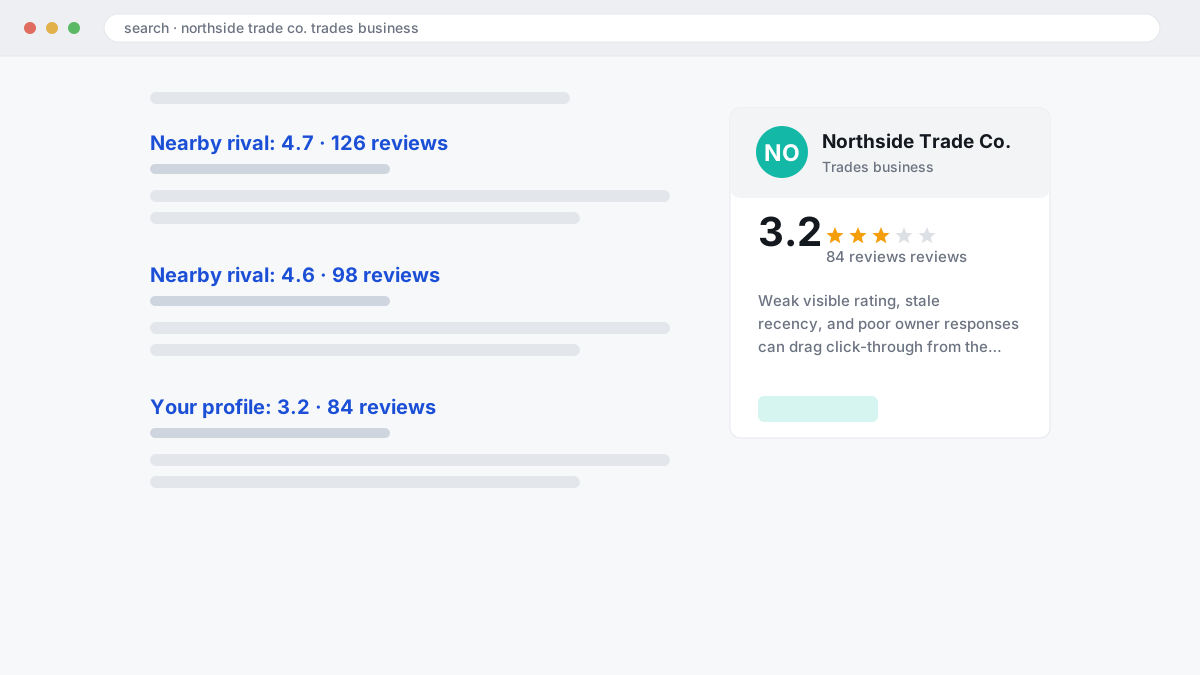
The wrong move is chasing raw count because it feels measurable. That fails when your star-rating distribution already looks shaky: a long tail of 1-star and 2-star reviews can drag click-through from the local pack even if your total volume looks respectable, and poor owner responses make the damage easier to believe. In BGR Review’s dataset of trades businesses with complete enquiry-source data, observed February to July 2026, 70–80% of calls and bookings were attributed to a Google Business Profile or Yelp listing, which is why a weak-looking profile can cut conversions before local SEO gains have time to matter.
The right order is simpler. First, reduce the conversion drag by replying properly to recent negatives, adding calm owner responses that address the issue without arguing, and increasing the share of new positive reviews so the visible rating mix improves. Next, fix recency: if your latest review is older than 30–90 days, the profile looks inactive, and searchers hesitate even when your average rating is fine.
Push hard on count only after those two are under control, and only if close competitors in the same category, distance band and map pack are clearly ahead on volume. Count helps local SEO and branded search demand, but it works best when the profile already looks current and credible. If you use a managed service at that stage, keep the brief narrow and policy-safe; BGR Review’s review packages include a 30-day free replacement guarantee, which matters more than inflated volume promises.
What should you check when review requests suddenly stop working?
When review requests stop working, audit the process before blaming Google. Most stalls happen before a customer ever reaches the submission screen: the direct review link breaks, staff stop asking, follow-ups vanish after 7-14 days, or the wrong channel cuts completion.
The wrong move is to assume Google blocked your profile and keep sending the same request harder. That fails because you learn nothing about the leak. Check the link path first: does the button still open the correct Google Business Profile review form on mobile, without extra login steps or a homepage detour? Then check staff compliance. In BGR Review-managed campaigns, the first failure point is often simple: the job closes in the CRM, but the ask never goes out because a pipeline stage changed, a template was unpublished, or the front desk stopped using the script.
If the link works, trace response rate by channel and timing. SMS usually removes more friction than email for local services, but a heavy-handed same-day blast can hurt review velocity if every request lands at once and only a handful convert. A sudden spike in sent volume can raise filtering risk, especially if your profile went from steady weekly activity to a burst after weeks of silence. Keep the send pattern even, and make sure the second touch still fires inside 7-14 days.
Use a simple weekly comparison to find the exact drop-off stage.
| Stage | What to compare weekly | What the drop usually means |
|---|---|---|
| Request sent | Jobs closed vs requests triggered in your CRM and automation tools | Automation failure or staff skipping the ask |
| Link opened | SMS clicks vs email opens/clicks | Channel mismatch or weak timing |
| Review posted | Requests sent vs published reviews on the profile | Submission friction, filtering, or too-fast review velocity |
If requests are still going out but posted reviews fall, reduce friction before you change everything else. Swap to the direct link, restore the follow-up, and spread sends across the week. That usually fixes map-pack review growth faster than blaming an invisible block, and it protects click-through rate and conversions because your profile keeps adding fresh social proof instead of going stale.
How do multi-location brands grow reviews without losing control at store level?
Multi-location review growth works when brand standards sit at head office but every request stays tied to the individual branch. Each location needs its own Google Business Profile, direct review link, QR code, and reporting line so you can see who is asking, where, and through which channel.
One corporate link for every site is the wrong setup. It sends customers to the wrong profile, inflates one branch while weaker locations stay empty, and hides store-level problems until calls, bookings and map-pack clicks start slipping in the branches that matter most. The better model is location-level links with central oversight: one short URL and one QR code per branch, pushed through the local team, with brand-approved wording and owner responses controlled centrally.
Multi-location governance only works if the rules are fixed before rollout. Set one script, one follow-up cadence, and one escalation rule for anything unusual within 30 days, such as a sudden drop in review velocity, staff skipping the ask, or a location collecting off-topic complaints that need manager review. Then track requests by location, manager and channel inside your CRM or reporting sheet, because a weak branch usually shows up first as low send volume, poor completion from a single channel, or no recent reviews on its own Google Business Profile.
When does DIY automation beat a managed Google review service?
DIY automation wins when your team will reliably ask, send and monitor every request after the job closes. A managed service earns its keep when staff follow-through is patchy, multiple locations need oversight, or leadership wants policy-safe execution and reporting without chasing people every day.
Most plans fail at the same point: the software goes live, the Google Business Profile link is connected, and then nobody owns the trigger, the follow-up or the manager check. A CRM and automation tool can send the first text or email perfectly, but it will not fix missed job-close data, weak staff prompts, or a branch manager who forgets to review stalled request queues on Friday.
Use DIY when one person owns the workflow and can keep it clean for at least a full month. Use a managed option when you need setup, message approval, monitoring and exception handling, especially if your review flow depends on front-desk staff, field teams or several store locations acting the same way.
This side-by-side view is the real buying decision.
| Factor | DIY software | Managed service |
|---|---|---|
| Monthly cost | Usually lower software spend | Higher total spend because setup and oversight are included |
| Control | You own the CRM trigger, templates and Google review link routing | You approve the process, but someone else monitors execution |
| Speed to launch | Fast if your data and staff process are already clean | BGR Review setup typically starts in 24-48 hours once access and copy are approved |
| Integrations | Best if your CRM and automation tools already talk to each other | Better when those handoffs need building, testing and reporting |
| Policy guardrails | Easy to drift into review gating or uneven asking if nobody audits | Stronger if you need message review against Google Business Profile rules before launch |
The wrong buy is software alone when the real problem is operational accountability. The right buy is the option that matches your weakest link: cheap tools for disciplined teams, managed execution when inconsistency is costing you map-pack clicks, calls and form fills.
Where do Google’s rules block incentives, gating, and bought reviews?
Buying reviews, screening out unhappy customers, or offering rewards for positive reviews can lead to removals, loss of trust, or Google Business Profile trouble. Google’s review rules and your local laws both apply here, and this is general information rather than legal advice.
Most shortcuts fail because the Google review policy targets fake engagement, conflicts of interest and manipulated feedback, not just obvious spam. Paying for a five-star post, asking staff to review their own employer, or tying a discount to a positive rating creates a footprint Google can remove or filter, and the damage usually hits click-through rate in the map pack before you notice any ranking drop. If you are weighing software against a service, the safer route is a neutral request sent to every eligible customer with the same direct review link, the same wording and no reward attached.
Review gating is where many otherwise decent businesses cross the line. A two-step flow that asks “Were you happy?” and sends only satisfied customers to Google while diverting unhappy ones to a private form is exactly the kind of steering platform rules are meant to stop, because it distorts star-rating distribution and leaves owner responses looking selective. A policy-safe flow asks all customers for feedback in the same way, then uses follow-up and service recovery after the review request rather than before it.
The legal line also changes by country. In the US, the FTC’s rules on endorsements and testimonials require disclosure of material connections; in the UK, the CMA and the DMCC Act rules target misleading review practices; and defamation standards for false factual claims differ by jurisdiction. That is one reason BGR Review keeps review acquisition separate from its removal work, which is pay-after-success at $449 per removed link with $0 upfront, instead of bundling “clean-up” behind risky bought-review campaigns.
What does a policy-safe weekly Google review workflow look like in practice?
A workable Google review system runs as a weekly operating rhythm, not a one-off campaign. Every seven days, check requests sent, reviews posted, owner responses completed, and any stalls, then fix timing, channel friction, or weak staff prompts before the drop compounds.
One-time campaigns fail because they create a short spike and then nobody owns the next step. The practical setup is simpler: your CRM and automation tools trigger the review ask when a job closes, your manager checks one dashboard each week by channel, location, and staff source, and unresolved issues get flagged the same day instead of sitting in the Google Business Profile for a month.
If volume dips for two consecutive weeks, fix the basics first. Check whether the ask is still going out at the point of highest satisfaction, whether the direct review link still opens in one tap on mobile, and whether one staff member or one branch has stopped asking consistently; in multi-location governance, local freedom without a weekly audit usually turns into patchy review velocity and missed map-pack clicks.
Use one view that forces decisions rather than a report nobody reads.
| Check every 7 days | What you want to see | What to fix first if it slips |
|---|---|---|
| Requests sent | Consistent output by location and staff source | Broken CRM trigger or staff prompt |
| Reviews posted | Steady completions, not one burst | Bad timing or link friction |
| Owner responses | All new reviews answered within the same weekly cycle | No reply owner or weak store-level governance |
| Issues flagged | Policy risks and complaints logged fast | Missing escalation path |
This is where a managed service earns its keep if your team will not maintain the loop. BGR Review sells review growth and pay-after-success removals at $449 per removed review link with $0 upfront, but if your locations already follow one weekly dashboard and reply discipline, DIY automation is often the cheaper route.
Where to go from here
Start with a one-week audit of your review request flow. Check three points: when the ask goes out after the job closes, how many clicks it takes to reach your direct review link, and whether a second follow-up is scheduled if the first message gets ignored. That simple check usually tells you why review velocity has flattened even when calls, bookings and form fills are healthy. If your map-pack clicks are rising but branded search demand and conversions are not, your profile often needs fresher reviews and better owner responses rather than more traffic.
Your next step is to fix one bottleneck at a time. Send the first request while the work is still recent, test SMS against email, and have a manager spot-check whether staff are actually using the script you approved. Expect clearer response patterns within a few weeks, not overnight. If execution is the problem, compare the cost of building CRM triggers and staff follow-up into your own process against a managed setup. BGR Review handles Google review delivery with policy-safe workflows, delivery starting in 24-48 hours, and a 30-day free replacement guarantee on review packages.