


Quick answer
Sentiment analysis sorts review text by attitude, usually positive, neutral or negative, then groups the reasons behind it so you can act on the pattern rather than guess from star ratings alone. For review work, the useful setup is simple: pull reviews from each platform, score the text, check the confidence score, tag the theme, and send the issue to the right owner. Most teams start with 3-way polarity classification, then add aspect-based sentiment analysis for themes like service, delivery or pricing. Google Business Profile gives you stars and text, but no built-in sentiment score.
This guide comes from review operations, not software-demo prose. At BGR Review, we handle Google, Trustpilot, Yelp, Clutch and TripAdvisor review campaigns and negative review removal, and the practical problem is always the same: a low-sentiment spike has to be checked against platform source, split into removal candidates versus valid complaints, and assigned before reply deadlines slip.
That distinction matters because the first action is rarely “answer every bad review”. Google’s review policy can remove some content, while a valid complaint needs a reply, a service fix and follow-up tracking to see whether sentiment recovers. We’ve served 15,000+ businesses, offer a 30-day free replacement guarantee on review packages, and handle removals on a pay-after-success basis at $449 per removed review link with $0 upfront.
How does sentiment analysis become a weekly review operating system, not just a chart?
Review sentiment analysis works when you run it as a weekly operating system, not a reporting exercise. Pull the last 7 days of reviews from your main review sources, classify the tone, cluster the theme, assign an action, and then check the next Monday whether replies, fixes or escalations changed the pattern.
The wrong setup is a pretty dashboard reporting screen that shows red, amber and green trends with no owner attached. It fails because a dip in Google, Yelp or Trustpilot sentiment does nothing on its own: nobody replies, nobody checks whether a review breaches platform policy, and nobody fixes the issue behind the complaint. The useful setup is a response workflow tied to each trend. If Monday’s batch shows low-sentiment delivery complaints on Google and refund complaints on Trustpilot, your support lead answers valid complaints, your ops lead fixes the process, and your reputation lead separates removal candidates from reviews that need a public reply.
That last step matters. A one-star post with abuse, conflicts of interest or clear policy issues goes into a removal check first; at BGR Review, that route is pay after success at $449 per removed review link with $0 upfront, while valid complaints stay in the reply-and-fix queue. Dashboards matter after they trigger action. They help map-pack click-through, branded search demand and conversions only when each trend becomes a named task for one team that week.
Which review sources should you analyse first so the signal is actually useful?
Start with the review source that influences buying decisions most. For most local brands, that means Google reviews first, then Yelp, Trustpilot, or a vertical platform only after you have mapped each source's rules, typical volume, and who on your team owns replies.
Most guides push you to pull in more review sources straight away. That fails because the feeds are not comparable on day one: Google reviews often carry the most local intent and map-pack impact, Yelp has its own recommendation software, and Trustpilot usually reflects a different stage of the buying journey. In BGR Review's dataset of 1,485 businesses observed February to July 2026, trades businesses with complete enquiry-source data attributed 70–80% of calls and bookings to a Google Business Profile or Yelp listing, which is why local brands usually get the clearest first signal from Google before expanding outward.
Add other review sources after you document source rules in plain English: what counts as a verified review, what gets filtered, and who can respond. Then use at least 8 to 12 weeks of review data before you compare sentiment trends, because a thin Trustpilot feed or a burst of Yelp reviews can distort the picture and send you fixing the wrong issue. Better sources beat more sources because they give you a stable baseline for weekly replies, escalation, and location-level decisions.
How do you analyse customer review sentiment step by step without building an NLP team?
A usable review-sentiment workflow is straightforward: pull every new review once a week, remove duplicates, classify the tone, tag the theme, sense-check low-confidence calls, route urgent issues, and compare this week with last week by platform and location.
Most guides start with natural language processing and machine learning models. That fails for a marketing team because model theory does not tell you who replies, who fixes the branch issue, or which review needs a policy check today. Start with an export from Google, Trustpilot, Yelp, Clutch or TripAdvisor that includes five fields every time: date, location, star rating, review text and platform. Then add four tags in one sheet or dashboard: sentiment, theme, urgency and owner response status. That is text classification in a form your team can run on Monday morning without hiring an NLP team.
The practical rule is simple. Positive reviews still get tagged because they show what to repeat; neutral reviews often contain the first warning sign; negative reviews split into valid complaints and removal candidates. If a review alleges fraud, abuse, discrimination, safety issues or impersonation, escalate it inside 24 hours through your response workflow, not at month end. In removal work, speed matters: across 12,000+ negative review cases logged by BGR Review from June 2025 to June 2026, reviews raised within 28 days of posting and backed by an identifiable policy issue resolved successfully in roughly 90% of cases, while comparable cases raised later fell to approximately 25–30%.
Keep the weekly review small enough to finish. One person exports, one person tags, and one owner per location closes the loop by replying, fixing the cause and marking the status.
How should you score positive, neutral, and negative reviews so teams classify them consistently?
Polarity classification assigns each review to positive, neutral, or negative sentiment from the words on the page, not the star label alone, so your team can measure direction and volume the same way every week. For review operations, that means one 3-star post on Google or Trustpilot gets scored from its text before it enters your reply queue, escalation list, or removal check.
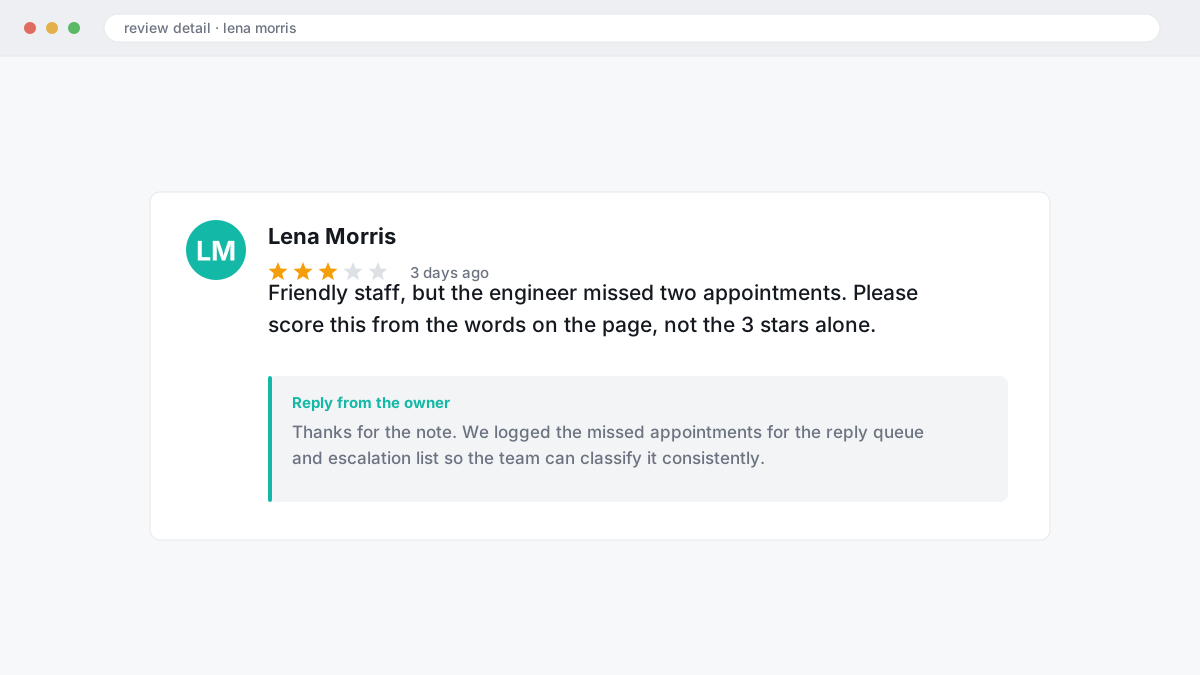
The wrong approach is to treat 5 stars as positive sentiment, 3 stars as neutral sentiment, and 1 star as negative sentiment by default. That fails as soon as the text and rating split: a 3-star review saying “friendly staff, but the engineer missed two appointments” carries negative sentiment for operations, while a 1-star post with no detail may stay unclassified until a human checks context. The fix is written text-based polarity rules. In BGR Review’s workflow, mixed 3-star reviews are neutral only when praise and criticism are balanced and neither side points to a clear service failure; if the complaint names a missed booking, billing issue, or unresolved support problem, score it as negative sentiment.
Start with a calibration sample of 50 reviews before you roll tags across the company. Have two people score the same 50, compare disagreements, tighten the wording, and only then push the rule set into your dashboard reporting or CRM and helpdesk integration.
How do you find the real problem inside a review instead of just calling it negative?
Aspect-based sentiment analysis splits the subject from the feeling, so “helpful staff but slow delivery and confusing billing” turns into separate signals instead of one blunt negative label. You get positive service quality, negative delivery, and negative billing in the same review, which gives your team something concrete to fix.
The wrong approach is to tag that review as simply negative and move on. That fails because reply teams, branch managers and ops leads all receive the same vague label, so nobody knows whether to improve staffing, dispatch times or invoicing. In a weekly review workflow like the ones we build around Google and Trustpilot feedback, one mixed review often needs two owners: front-of-house for service quality, accounts for billing, while delivery sits with fulfilment.
The right approach is issue-level diagnosis. A single review can praise the receptionist, criticise a 40-minute wait, and complain about an unexpected charge; aspect-based sentiment analysis keeps those strands separate, so your response can acknowledge the good point, address the delay, and check the invoice before the next reply window opens.
Theme clustering then shows whether that complaint is isolated or repeating. Manual scrolling hides this because wording changes from “late order” to “driver never arrived” to “delivery slot missed”; clustering groups those phrases into one operational theme. That is where sentiment analysis becomes useful for conversions and map-pack clicks: fix the repeated complaint, then watch whether future review text shifts before your average rating catches up.
When do star ratings hide what the review text is really saying?
Star ratings and review text often pull in different directions: someone can leave 4 stars out of habit while describing late delivery, ignored messages, or poor support, and your average score will still look healthy. The wrong approach is rating-only reporting. It fails because a 4.3 average can mask a rating mismatch where the customer language has already turned negative.
This matters most when review volume is low at one location. A branch with eight reviews can keep the same average after one 4-star complaint, yet the text may contain clear signals about delays, rude staff, or missed follow-up that will hurt conversions and map pack click-through before the star average visibly drops. The fix is simple: compare star rating vs text sentiment every week, by location and by review source, and flag any review where the score looks positive but the wording does not. That weekly check catches silent risk early, gives your team something concrete to reply to, and stops one mild-looking rating from hiding a real service problem.
How accurate is sentiment analysis on reviews when sarcasm, mixed feelings, and short comments show up?
Review sentiment scoring is useful for direction, but accuracy drops fast on sarcasm, mixed feelings, slang, and one-line comments.
The wrong approach is to treat every automated label as certain. That creates misclassification and false positives: “great job losing my booking” can read as positive to a basic polarity model because of “great job”, while “fast delivery, useless support” can bounce between neutral and negative depending on which phrase the model weights more heavily. If your team auto-tags those reviews and pushes them straight into dashboard reporting, you end up replying with the wrong tone, missing a valid complaint, or wasting time checking removals that have no policy angle.
The safer setup is confidence-checked classification with tie-break rules. A high-confidence negative can enter your response workflow immediately; a low-confidence label, a short comment like “fine”, or anything showing sarcasm and mixed sentiment should pause for review before you assign an owner or judge likely impact on conversions, branded search demand, or map-pack click-through. For mixed reviews, set one rule and keep it fixed: if the main complaint affects booking, payment, or service delivery, escalate as negative even when the star rating is four or five; if the praise and criticism are balanced, hold it for manual review instead of forcing a label.
Should you use a sentiment analysis tool or tag reviews manually?
Manual tagging gives you nuance and context; software gives you speed and scale. Most growing teams do better with a hybrid setup: let a tool handle first-pass sentiment, then have a person review low-confidence items and any review that could trigger an escalation, reply change or removal check.
The cheap-looking mistake is to keep everything manual after volume has already outgrown it. If you are handling fewer than 100 reviews a month across Google, Trustpilot, Yelp, Clutch or TripAdvisor, a spreadsheet and a tight tag list can work well, especially in nuanced categories where one line can read as praise for staff but criticism of pricing. Past that point, manual tagging starts missing trends: you stop seeing theme clustering across locations, your weekly dashboard reporting lags, and problems that hurt map-pack click-through rate or conversions sit in the queue too long.
This is the practical split to use.
| Approach | Best fit | Where it breaks |
|---|---|---|
| Manual tagging | Under 100 monthly reviews, one location, high nuance | Slow comparisons, weak trend detection, no clean cross-location reporting |
| Tool-led | Higher volume, several locations, weekly reporting | Mixed sentiment, sarcasm and short reviews can be misread |
| Hybrid | Growing brands that need speed without blind spots | Needs clear rules for what humans must check |
The better process is simple: automate polarity scoring and theme clustering first, then route anything with a weak confidence score, legal risk or platform-policy angle to a human. That is where a reviewer decides whether the issue needs a public reply, an internal owner, or a removal review under a platform’s policy.
What does sentiment analysis actually improve in reputation, and what should you fix first?
Sentiment analysis improves reputation when it changes what your team does this week: fix the negative themes that repeat, shorten reply times, and route serious complaints fast instead of chasing a prettier average score. The first payoff usually shows up in your response workflow, because a review answered in hours with the right owner attached is less likely to sit in public view unanswered while prospects compare you in the map pack.
The wrong approach is collecting more labels, more charts, and more platform data than anyone will act on. That fails because dashboard reporting turns into a reading exercise, while the same complaint trends keep hurting click-through rate, calls and bookings. The right approach is narrower: count repeated themes by review source, separate removal candidates from service failures, and fix the theme that appears most often even if your average rating has barely moved.
Negative theme frequency usually matters more early on because repeated complaints about lateness, billing or rude staff suppress conversions before they produce a visible rating drop. In BGR Review's dataset of trades businesses with complete enquiry-source data, observed February to July 2026, 70-80% of calls and bookings were attributed to a Google Business Profile or Yelp listing, so faster replies and cleaner escalation on those profiles affect branded search demand and local pack performance sooner than a broad sentiment score does. Track three outcomes every week: review trend, response time, and issue-resolution closure rate.
How should multi-location businesses set this up so one branch does not hide another?
Multi-location sentiment analysis works only when each branch has its own trend line, alert threshold and named owner. A brand average hides the branch that is slipping, so your dashboard reporting needs location comparison by site, review source and theme before you decide what to fix.
The wrong setup rolls 20 branches into one score and calls it insight. That fails because map-pack visibility, click-through rate and conversions move at location level, not head-office level; one weak Google Business Profile can lose calls and bookings while the brand average still looks fine. The setup that works assigns each branch its own threshold, such as a sudden run of low-sentiment reviews in a week, then routes the case through a practical workflow: confirm the platform source, separate policy-based removal candidates from valid complaints, tag the theme, and give the branch manager or regional lead one owner for the fix.
Multilingual reviews need native checks before you trust the score. Machine translation flattens local wording, sarcasm and service slang, so a London branch, a New York branch and a Thornhill branch should not share one translated sentiment bucket if you want clean location comparison and reliable branch-level reporting.
What should a review sentiment scorecard include so your team can use it this week?
A usable review sentiment scorecard logs the review source, location, star rating, text sentiment, theme, confidence score, urgency, owner and action status, so your team can move from detection to response in one weekly sheet. Add the review date first, because a low-sentiment Google review posted yesterday needs different handling from an older Yelp or Trustpilot complaint that already stalled.
A raw export fails because it gives you rows of text and ratings without a decision path. The right format is action-ready: every negative review gets a confidence score column, so low-certainty polarity calls can be checked by a person before you escalate, and an action status column, so dashboard reporting shows open, in progress, replied, removal check, or closed.
Use this column set:
| Date | Source and location | Rating and sentiment | Theme, urgency, owner, confidence, status |
|---|---|---|---|
| Review date | Google, Yelp, Trustpilot, Clutch; branch or city | Star rating; positive, neutral, negative | Theme tag, urgency, named owner, confidence score, action status |
Add one weekly summary row above the detail lines: top three themes, unresolved cases, and the review sources driving them. That gives you dashboard reporting your branch manager or marketing lead can use in the next seven days, rather than another sentiment chart nobody acts on.
What should you do after negative sentiment patterns appear across reviews?
When negative patterns show up, move in order: confirm the signal is real, isolate the repeated complaint, send each case to the right owner, reply publicly where needed, and review the next seven days to see whether sentiment improves. Treat it as a weekly operating system, not a dashboard export.
The wrong move is chasing reply speed on its own. A polished negative review response can steady click-through rate from the map pack for a day or two, but conversions, calls and bookings keep slipping if the same delivery delay, billing error or staff issue keeps generating fresh complaints. The better move is to escalate any repeated high-severity theme to operations within 24 to 48 hours, then push each valid service failure into CRM and helpdesk integration with clear ticket routing: refund issue to finance, missed appointment to dispatch, broken handoff to the branch manager.
Check source before you assign blame. If the spike came from Google Business Profile, Yelp or Trustpilot, separate reviews with a possible policy breach from genuine complaints, because removal candidates need evidence and platform-specific handling, while valid complaints need service recovery. If it does not, answer publicly, name the fix, close the helpdesk ticket only after follow-up, and watch whether branded search demand and location-level conversions recover the following week.
Where to go from here
Treat your review data like an operations queue, not a report. Score the text, check whether the platform source is Google, Trustpilot, Yelp or another review channel, tag the cause, then decide who owns the fix: support, location manager, compliance, or a removal check where the content appears to breach platform policy.
Your next step is a reputation management assessment built around the reviews you already have. You should expect three outputs from it: a clear sentiment baseline by location or service line, a short list of recurring complaint themes pulled from the review text rather than the star rating alone, and a decision split between reviews that need a reply, reviews that need an internal fix, and reviews worth checking for removal eligibility.
If the pattern points to valid complaints, the cheaper move is usually process repair first, then tracking whether sentiment, map-pack clicks and conversions recover.