


Quick answer
Google My Business is now Google Business Profile, a rename Google rolled out in 2021, and the practical job is still the same: claim the listing, complete verification, fill every core field accurately, add real photos, post updates, and respond to reviews quickly. After setup, the biggest local gains usually come from stronger primary and secondary categories, complete service entries, and better image quality rather than keyword stuffing in the business name or description. If you are dealing with fake or policy-breaking reviews, treat that as a separate removal track under Google Business Profile review policy rules.
This page comes from live profile and review work, not a recycled setup checklist. We handle profile optimisation alongside review acquisition and removals, and the split matters because a weak category setup needs edits inside the profile, while a false review needs evidence, policy matching and a separate appeal path.
Across 12,000+ negative review cases logged between June 2025 and June 2026, the failure point we see most often is thin evidence: the business used the in-platform report button and nothing else. That is why this guide focuses on what usually blocks calls, clicks and map visibility after verification, including duplicate profiles, missing services, unanswered reviews and fake-review issues that need a different process.
How Google Business Profile works in Search and Maps
Google My Business became Google Business Profile in 2021, and it is the listing system that puts your business into Google Search, Google Maps and the local pack for location-based queries. If someone searches your brand, a service plus town, or taps “near me”, Google may show your profile with call, website, direction and review actions directly on the results page. That matters because, in BGR Review’s own 2026 dataset of trades businesses with complete enquiry-source data, 70–80% of calls and bookings were attributed to a Google Business Profile or Yelp listing rather than a website.
Most setup guides overstate completeness. Filling every field helps Google understand the business, but visibility still turns on Google’s three core local ranking factors: relevance, distance and prominence, as described in Google Business Profile Help. A complete profile in the wrong category, too far from the searcher, or carrying weak review signals can still sit below a less polished competitor, which is why BGR Review treats profile management and review management as the same job rather than separate tasks.
Claim, create and verify the right listing first
Claim the existing Google Business Profile first, because creating a fresh listing when one already exists usually gives you a duplicate that splits reviews, calls and map visibility. Search your business name, old phone numbers, old addresses and any previous trading name in Google Search and Maps before you touch the “Add your business” flow. If a profile already exists, use Google Business Profile’s ownership claim route instead of making a second record; once reviews land on the wrong listing CID, cleanup becomes slower and you can end up with support threads instead of a verified profile.
Verification now depends on category, edit history and Google’s risk checks, and video verification is common. Google may still offer phone, email or postcard in some cases, but many owners are asked for a live or recorded video that proves location, signage, stock, tools or access to staff-only areas. A service-area business can be asked to show branded vehicles, equipment and proof that the business operates from the submitted base location even when the street address stays hidden.
If you run a bulk-location brand or a service-area profile, expect more review time after submission. Those setups often trigger extra manual checks, and the delay gets worse when the name, website, category and legal documents do not match cleanly. Keep verification separate from review problems: a suspended or unverified profile will not be fixed by reporting fake reviews, and fake-review removal follows its own evidence route at BGR Review with $0 upfront and $449 per removed review link after success.
Choose the primary category that matches the main revenue service
Your primary category tells Google Business Profile which search intent your listing should rank for, so choose the service that drives the most revenue rather than the broadest label. Google lets you add secondary categories, but the first one carries the strongest local relevance signal in Search and Maps. In BGR Review profile audits, category fit is the first check because a weak primary category can blunt calls and map visibility even when reviews, photos and replies are in good shape.
Pick one core category first, then add secondary categories only where the service is genuinely offered and fulfilment is real. A dentist should usually lead with Dentist; adding Cosmetic dentist can make sense if that work is actually sold, but Cosmetic clinic is a different business type and creates mixed relevance unless both services exist on site. The same rule applies across local trades, clinics and agencies: if the category describes a service you do not deliver, leave it out.
Most guides treat categories like a box-ticking exercise. They are closer to a ranking filter. If your listing is attracting the wrong enquiries, or ranking for terms that never convert, recheck the primary category before you spend money on review growth or removal work such as BGR Review’s pay-after-success fake review service at $449 per removed link with $0 upfront.
Fill the fields that change clicks, calls and direction requests
The profile fields that move clicks, calls and direction requests fastest are the ones Google can verify against your real-world business details.
Start with your business name, primary phone number, opening hours and website URL. These must match the details you actually use on your storefront, invoices, booking system and contact page. If your profile says one thing and your site or signage says another, Google Business Profile can still show you, but you create friction for the customer and invite unnecessary edits from users. In BGR Review audits, this is one of the first checks before any review-growth or removal work, because a profile with a mismatched phone number wastes leads immediately.
If the basics are already complete, fill the fields that help a searcher act without thinking. Add attributes that apply to the business, add a working appointment link if you take bookings, and build out the services list with the real services you sell rather than broad category labels. A roofing company should list roof repair, leak detection and gutter replacement, not just “roofing”. Those fields often improve click-through because the searcher can confirm fit before they call.
Holiday hours need attention before the closure happens, not after the missed calls come in. Google lets you set special hours for public holidays and one-off closures, and failing to do that is a common cause of angry reviews that were avoidable. If you close for bank holidays, staff training days or seasonal shutdowns, update special hours several days ahead and check them again the day before.
Write a business description that supports conversion, not keyword stuffing
Your Google Business Profile description should tell a searcher what you do, where you serve and why they should trust you, within Google’s 750-character limit. Lead with your main service, your real service area or town, and one concrete proof point such as “family dental clinic accepting new patients” or “emergency boiler repair across Bristol.” Repeating city names reads like spam, and Google’s business description guidance gives you very little upside for stuffing keywords into a field that many owners overrate.
Skip promotions, URLs, phone numbers and all-caps claims like “BEST IN LONDON” because they weaken trust and can push the copy into low-quality territory. Write like a real operator, not an advert: what you do, who you help, and what makes the visit or call easier.
Use photos and videos to improve trust signals on the profile
Photos and short videos improve trust on a Google Business Profile by proving that your location, staff and service are real before a searcher taps call or directions. Use real exterior, interior, team and service images. Skip stock photography. In BGR Review’s field-by-field profile audits, weak galleries usually fail the same basic test: the building cannot be recognised, the service is not shown, or every image looks like it came from a template library.
Fresh media helps people confirm they have the right business, especially on profiles with a common name or shared building. Update the gallery every month or after a visible change such as signage, fit-out, vehicles or uniforms. A short walkthrough video also cuts friction for hard-to-find locations by showing the entrance, parking and reception route, which can reduce wrong turns and no-shows before an appointment.
Build a review workflow that earns more feedback and better responses
A review workflow is a simple operating rule: ask every satisfied customer for feedback as soon as the job is complete, then reply to every new review within 24 to 72 hours.
Send the request while the service is still fresh. Use your direct Google review link from the Business Profile dashboard, put it in SMS or email, and tie the ask to the completed job: “Thanks for using us for your boiler repair today — if the work was good, here is our Google review link.” In BGR Review’s dataset of 1,485 businesses observed from February to July 2026, new trades and local service businesses typically saw first reviews around two weeks after launch, and early reviews were mostly positive. The cheap route is consistency, not volume tricks. If you want this outsourced, BGR Review sells review packages with a 30-day free replacement guarantee, but a disciplined in-house send process usually comes first.
Reply fast because silence makes the profile look unmanaged. For positive reviews, mention the service context without adding private details: “Thanks for trusting us with your roof inspection” works; naming the address, invoice value or family details does not. For negative reviews, acknowledge the issue, invite the customer to continue offline, and avoid arguments in public. Google’s Business Profile review policies prohibit spam and off-topic content, but plenty of legitimate complaints stay live, so your response still matters even when you plan to challenge a fake review separately. Keep one template per service line, then personalise the first sentence so replies do not read copied.
Remove fake reviews and report local spam the right way
Removing fake reviews and local spam means using Google’s policy routes in the right order, with evidence, before bad data hardens into your profile history.
Start with reviews that breach Google’s prohibited and restricted content policy: spam, off-topic rants, conflict-of-interest posts, impersonation, harassment, or claims about a transaction that never happened. Use the in-profile report option first, then keep screenshots, order records, booking logs, message history, and the reviewer name exactly as shown. Across 12,000+ negative review cases in BGR Review’s records, reviews raised within 28 days of posting and backed by an identifiable policy issue resolved successfully in roughly 90% of cases; beyond 28 days, the observed success rate fell to approximately 25–30%.
If the review stays live after flagging, move to the Google Business Profile appeals process with the same evidence pack rather than filing the same short report again. This is where weak cases usually fail: in BGR Review’s case file, roughly 90% of businesses that came to us after a failed attempt had used only the basic report button, with no supporting documentation, and 70–80% of those initial requests had been rejected. A rejection does not prove the review is genuine, but Google will usually refuse removals where the complaint is really “I disagree with this opinion”.
| Issue | Best route | What to submit |
|---|---|---|
| Fake or policy-breaking review | Report review, then Business Profile appeal | Policy reason, screenshots, proof no customer relationship existed |
| Keyword-stuffed business name | Suggest an edit or redressal/spam form | Real-world business name from signage, website, legal docs |
| Fake address or duplicate listing | Report as spam or duplicate | Map links, photos, street view, proof of the correct location |
Spam edits matter because a rival’s stuffed name, false service-area pin, or duplicate profile can outrank a cleaner listing in Maps. Rules also vary by country and platform; this is general information, not legal advice.
Publish updates only when they support a real business action
Google Business Profile posts work when they push one real action tied to a live business update. Use them for an event, a limited offer, a product launch, a menu change, or a time-bound notice such as bank-holiday opening hours. Google gives you clear post formats for offers, events and products, so match the post type to the action instead of publishing a generic “news” update.
A weekly schedule is optional. A useful post once a month beats four filler posts that say nothing, and each one should ask for only one action: call, book, learn more or visit. If you are already sending new customers to Google for feedback, including through a BGR Review review package with a 30-day free replacement guarantee, keep the post CTA aligned with the same booking or contact page so you can judge whether the update supported calls or visits.
Track performance with Business Profile metrics and local landing pages
Business Profile tracking means measuring the actions that turn map visibility into leads: calls, website clicks, direction requests and booking actions, compared month over month against the page those clicks land on.
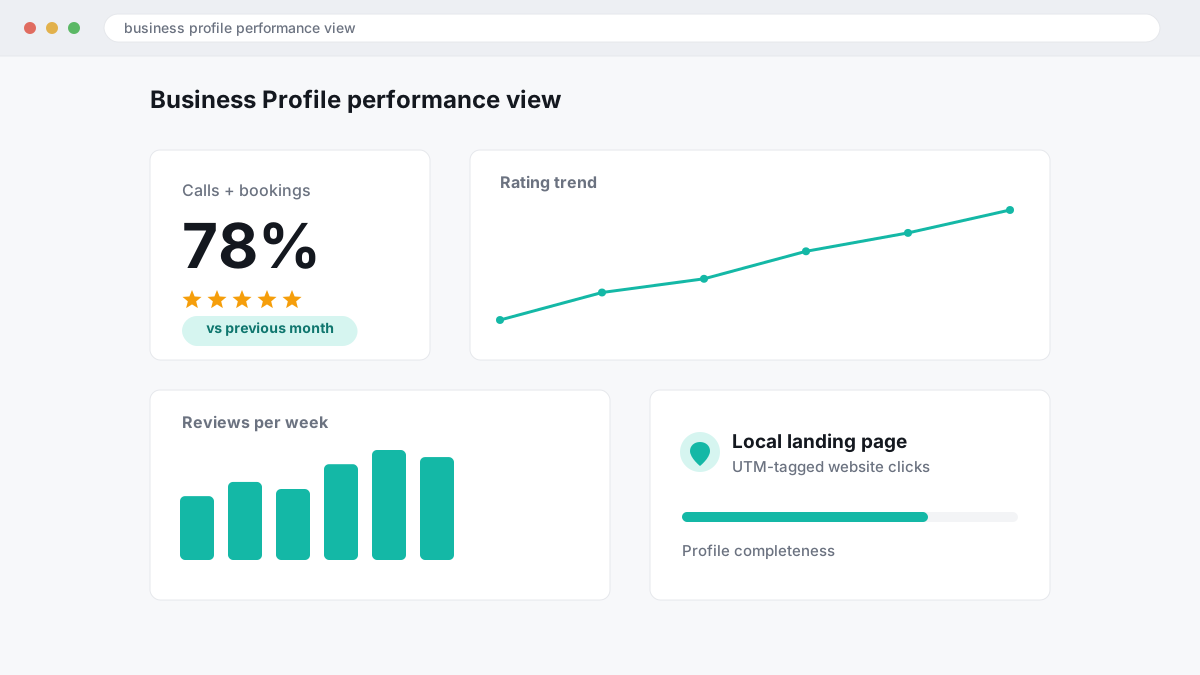
Start inside your Google Business Profile performance view, then check the same month against the previous month rather than reacting to a single busy week. For local service firms, that stops vanity reporting. In BGR Review's own 2026 dataset of trades businesses with complete enquiry-source data, 70-80% of calls and bookings were attributed to a Google Business Profile or Yelp listing, so the profile often carries more lead weight than the website.
Use a UTM-tagged website link on the profile so Google Analytics can separate Business Profile traffic from other Google visits. A simple source and medium setup is enough if you keep it consistent. If calls and qualified visits do not rise, better map impressions have not solved the real problem.
| What to track monthly | What it tells you |
|---|---|
| Calls | Whether searchers trust the profile enough to contact you directly |
| Website clicks with UTM tags | Whether the profile sends identifiable traffic into Google Analytics reports |
| Direction requests | Whether local intent is rising for your service area or storefront |
| Booking actions | Whether visits turn into a measurable next step |
Match each tracked action to a local landing page with the same service and location intent. If the profile promises emergency plumbing in one town and the click lands on a generic home page, you lose qualified traffic before the enquiry starts. That is usually a page problem, not a profile problem.
Fix the issues that suppress visibility after the profile goes live
Weak local visibility after launch usually comes from guideline issues, bad profile structure, or edits that make Google doubt the listing.
Suspensions usually follow a trigger, not bad luck. Google Business Profile suspends listings for guideline breaches such as unsupported business models, keyword-stuffed names, virtual office addresses, or service-area businesses showing an address where customers are not actually served. Risky edit bursts can do it as well: change the name, primary category, address and phone in one session and you raise the chance of a manual or automated check. If your business is a service-area operation, Google’s rules require you to hide the address unless customers can visit during stated hours; if they cannot, remove the address before you edit anything else.
Most guides say “fill everything in”. What actually suppresses performance more often is filling the wrong fields. A wrong primary category weakens relevance, inconsistent opening hours reduce trust, and duplicate practitioner listings split reviews and ranking signals. Doctors, lawyers and similar professionals often end up with one firm profile and several duplicate personal profiles; if those duplicates are unsupported, they need merging or removal before you judge visibility.
If you are diagnosing a weak profile, check edits in this order: primary category, address visibility, hours, duplicate listings, then service and product completeness. Google will ignore a lot of cosmetic optimisation if the core entity data looks conflicted. Across 12,000+ negative review cases logged by BGR Review from June 2025 to June 2026, reviews raised within 28 days and backed by a clear policy issue resolved successfully in roughly 90% of cases; beyond 28 days, observed success fell to approximately 25–30%. The same logic applies to profile problems: fix them early, while the evidence trail is still clear.
Where to go from here
Run a full Google Business Profile audit before you change anything else. Check the primary category first, then duplicates, then missing services, opening hours, photos, review-response gaps and any policy risks that could trigger a suspension. Keep optimisation work separate from review disputes. A thin profile needs field fixes and fresh activity; a fake or damaging review needs evidence, policy matching and the right appeal route.
Your next step is simple: open the profile, export or screenshot the current state, and work through the weak fields in order of impact. Start with categories, duplicates and services because those affect how Google matches you to local searches. Then fix trust signals such as owner responses, recent photos and unanswered negative reviews. If a review looks false, do not bury it inside a general tidy-up. Build a separate removal file with the review link, posting date, reviewer details and the exact Google Business Profile review policy issue.