

Quick answer
Google AI Mode is an AI-first search experience that answers broad, follow-up-heavy queries inside Search instead of relying only on blue links. In its US launch through Google Search Labs, it builds one response from multiple sources and shows citation links back to those sources. For your brand, the main risk is visibility, not access. If your Google Business Profile, site content, structured data and recent review signals conflict, AI Mode can assemble the wrong summary before a searcher reaches your website, which can cut click-through rate, map-pack clicks and lead quality.
We handle the inputs that shape those answers: verified review growth, negative review removal and the profile corrections that stop bad summaries spreading across search surfaces. The practical work is rarely the flag button alone. A weak case usually fails because the business submits no supporting trail beyond the in-platform report, while a stronger one lines up the exact review link, policy reason, profile evidence, date stamps and matching business details before anything is filed.
That matters here because launch coverage explains features, but skips the part you have to fix on Monday morning: source accuracy, review recency, local listing consistency and the citation trail behind an AI-led answer.
Why does Google AI Mode matter more than another search feature launch?
Google AI Mode matters because it can answer multi-step searches inside Google Search, which cuts the weight of ten blue links and raises the value of citation links, accurate business details, and strong review trust across Search, Maps, and listings. If your brand is missing from the source trail, ranking alone will not save the click-through rate you used to get from a familiar top result.
Most launch coverage stays on access, demos and whether AI Mode came out of Google Search Labs. That is the wrong approach for a brand team, because it treats this like another interface update. The operational issue is brand entity recognition: whether Google can connect your name, site, Google Business Profile, reviews and third-party mentions into one clear entity worth citing. That is why an answer can mention a competitor with weaker classic rankings but cleaner citations and better corroboration.
Your first move depends on what you sell. Publishers need pages that can be cited cleanly. Ecommerce brands need product, policy and merchant details to stay consistent. Local businesses need their Google Business Profile and review recency checked first; in BGR Review's dataset of trades businesses with complete enquiry-source data, observed from February to July 2026, 70–80% of calls and bookings came through a Google Business Profile or Yelp listing rather than a website.
How does Google AI Mode actually build an answer from your query?
Google AI Mode turns one prompt into a set of related sub-queries, pulls sources from Google Search, and uses Gemini models to assemble one answer with citation links. That shifts the job from winning a single blue-link ranking to being eligible across several source paths at once, which is why entity clarity and content consistency matter so much to the brands BGR Review helps on Google.
Most guides still explain search as one query going in and one ranking list coming out. That logic fails here because AI Mode uses query fan-out: if you ask for the best roofer near you, pricing, warranty terms, review sentiment, service area, and brand reputation can all be checked as separate retrieval steps before Google synthesises a reply. The answer works because Gemini compares those inputs, removes overlap, and returns a single response instead of making you run five searches yourself.
Google Search Labs mattered because early AI Mode testing happened there before wider rollout beyond experiments, which gave Google a controlled way to watch how people rewrote prompts, opened citation links, and refined follow-up questions. For your brand, the practical point is simple: Google can now reach your Google Business Profile, site pages, and review language through several routes in the same session, so one inconsistent phone number, weak service-page wording, or thin review profile can break source eligibility even when you still rank for the original term.
How is AI Mode different from AI Overviews when both appear in Google Search?
AI Overviews are summary blocks added to some result pages, while AI Mode is a more interactive Google Search experience built for multi-step questions and follow-up prompts. You need to watch both surfaces because the citation links, position of organic results, and the clicks your brand earns can differ.
Most guides treat them as the same AI feature. That fails because the user behaviour is different. AI Overviews, which grew out of Google's Search Generative Experience tests in Search Labs, usually sit closer to classic search: a summary appears, source links show, and the searcher can still drop into standard organic results. AI Mode behaves more like chat inside Search, so a user can ask a compound question, refine it, and keep the session going without returning to a fresh results page each time.
If you want the practical distinction, compare the two surfaces side by side rather than looking at screenshots in isolation.
| Surface | What usually triggers it | Depth and citations | What happens next |
|---|---|---|---|
| AI Overviews | Selected informational searches where Google adds a summary layer above or among results | Shorter summary, visible citation links, stronger proximity to classic organic results | User often clicks a cited page or scrolls to standard listings |
| AI Mode | Queries that invite exploration, comparison, planning, or follow-up prompts | Longer, more conversational answer path with citations feeding a back-and-forth session | User keeps refining inside Search instead of restarting from a new query |
The right approach is to optimise for both behaviours. For AI Overviews, make sure your page can win a citation and still compete in organic results. For AI Mode, tighten entity consistency across your site and Google Business Profile so follow-up prompts keep pulling the same brand facts instead of drifting to third-party summaries.
Will Google AI Mode reduce website clicks, or just change which clicks you earn?
Google AI Mode is likely to cut some informational visits while sending better-qualified visits through citation links when your page answers a precise sub-question. The metric that matters is your traffic mix, not raw sessions on their own.
The wrong read is simple: fewer clicks means weaker business performance. That fails because more search journeys now finish inside Google interfaces, especially zero-click searches around opening hours, price checks, comparisons and basic definitions, so your click-through rate can fall while calls, bookings and form fills hold steady or improve. If you sell through local discovery, the loss often lands on low-intent blog traffic first.
The better read is whether AI Mode is filtering out weak visits and leaving you with stronger ones. Citation links tend to reward pages that answer the exact follow-up, so a service page, pricing page or location page usually converts better than a generic article when the user arrives from an AI-generated answer. If the cited page resolves the sub-question fast, you can lose top-of-funnel volume and still gain more useful leads.
Track this for 30-60 days before you change budgets. Watch click-through rate in Search Console, branded searches in Google Search, lead quality in your CRM, and assisted conversions in GA4 rather than last-click only; if you are using BGR Review for Google review growth or for pay-after-success review removal at $449 per removed link with $0 upfront, judge that spend against calls and booked work, not session totals alone. That gives you an ROI view AI Mode cannot hide.
Can brands influence AI Mode answers, or are you stuck with whatever Google says?
You cannot write AI Mode answers yourself, but you can influence what Google is willing to trust. The practical lever is source consistency: tighten your brand entity recognition across your site, Google Business Profile, third-party mentions and structured data, then correct any obvious conflicts before Google’s systems keep reusing them.
The wrong approach is trying to “optimise for the answer” with one rewritten page or a burst of FAQ copy. That fails because AI Mode pulls from corroborated sources, not from whichever sentence on your site sounds most convenient. The right approach is boring and effective: keep your legal name, trading name, address, phone, service descriptions, opening hours and review profile aligned everywhere Google can crawl or cite, then mark key business details with schema that matches the visible page copy.
YMYL queries get checked harder. If you work in law, health, finance or anything else that can affect a person’s money or wellbeing, weak authorship, thin About pages, missing policy pages and conflicting profile details make trust harder to earn than in an ordinary local commercial search. If an answer is wrong because a source is false or policy-violating, the fix is still indirect: clean the source trail first, and only then push for removal or correction; where a review link qualifies, BGR Review’s model is $0 upfront and $449 only after success.
Why could local businesses feel AI Mode first in Maps, reviews, and nearby discovery?
Local businesses may feel AI Mode first because Google can pull nearby recommendations from Maps, review signals, and your Google Business Profile in the same answer. That shifts risk away from website-only SEO and onto profile accuracy, review quality, and category fit.
The weak approach is treating your site as the whole job: a clean service page, a few title tags, then hoping Google works out the rest. That fails on local intent because nearby discovery usually leans on the local pack, live Maps data, and business profile fields before a user reaches your site. In BGR Review's dataset of trades businesses with complete enquiry-source data, observed February to July 2026, 70-80% of calls and bookings were attributed to a Google Business Profile or Yelp listing rather than a standalone website. If AI Mode expands the query with query fan-out such as "open now", "best rated" or "near me", weak profile data can cut click-through rate before you even appear in consideration.
The stronger approach is local entity readiness: tighten your Google Business Profile category, make hours exact, and match service areas, phone, and landing-page location signals. That works because review signals do more than decorate a star average. Google can read star rating, recency, and review text that mentions the actual service, neighbourhood, or urgency, which helps brand entity recognition and local relevance inside Maps-driven answers. A plumber with fresh reviews that mention "boiler repair" and "South Croydon" gives Google more usable evidence than a prettier homepage with thin local proof.
Near-me visibility also breaks on small errors. A wrong primary category, outdated holiday hours, or reviews that never mention what you do can weaken local pack exposure, reduce conversions from calls and bookings, and push branded search demand toward a competitor whose profile is simply easier for Google to trust.
Which business assets should you fix first before AI Mode reshapes your visibility?
Start with the assets Google already treats as highest-trust inputs: your Google Business Profile, core site pages, structured data, and recent reviews. Then align citation links, categories, and brand facts so AI Mode can recognise one clear business entity instead of stitching together conflicting versions.
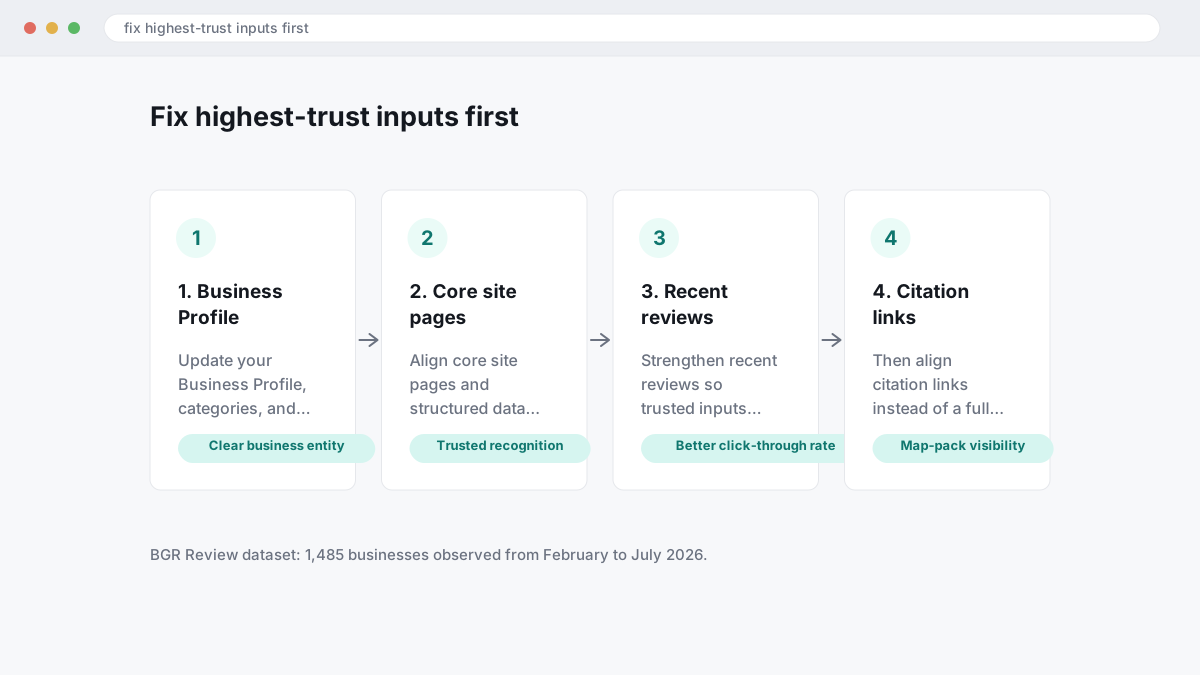
Most guides push a full cleanup across every directory at once. That usually fails because AI-led answers pull hardest from the sources Google already trusts for brand entity recognition, and your biggest losses in click-through rate, calls and map-pack visibility usually start there. In BGR Review's dataset of 1,485 businesses observed from February to July 2026, trades firms with complete enquiry-source data attributed 70-80% of calls and bookings to a Google Business Profile or Yelp listing rather than a website alone. Fix the highest-trust assets first, then widen out to supporting citations.
This is the 30-minute weekly cycle we give owners who need a copyable workflow.
- Spend 10 minutes on your Google Business Profile: check primary category, secondary categories, hours, phone, booking link, services, photos and the business description. If one field is outdated, AI Mode can repeat the wrong detail and depress local-pack clicks before you notice.
- Spend 8 minutes on core site pages: homepage, contact page, location page and top service pages. Match your NAP exactly, tighten service descriptions, and make sure the page titles reflect how people actually search.
- Spend 5 minutes on structured data: confirm LocalBusiness or the relevant subtype, openingHours, areaServed, sameAs and review markup all match the page and GBP. Broken schema does not create trust; clean schema helps Google connect citation links and brand facts.
- Spend 4 minutes on review recency: ask for fresh Google reviews, reply to the newest ones, and look for gaps longer than a few weeks. A stale profile can hold rank yet lose conversions because the AI summary looks dated.
- Spend 3 minutes on major citations: Apple Business Connect, Bing Places, Yelp, Facebook and key industry directories. Align NAP, categories, hours and short service descriptions so Google sees one entity, not five partial versions.
If you only have time for one fix this week, do not start with the tenth directory profile. Start where wrong data can change branded search demand, citation links, and conversions fastest: GBP, your main pages, and the review stream readers see before they click.
What should you do if AI Mode shows the wrong business details or a harmful claim?
If AI Mode shows the wrong business detail or repeats a harmful claim, trace the source before you do anything else. Accuracy corrections move faster when you submit dated screenshots, the exact search query, the AI Mode URL or citation link, and the verified fact you want Google to use instead of a general complaint.
Most people argue with the output. That fails because the answer usually reflects a source record somewhere else: your Google Business Profile, a page on your site, or a third-party citation such as a directory listing or old press mention. The right move is to fix the source first, then send feedback on the AI response with the corrected evidence attached; that gives Google's systems and support routes something concrete to verify.
Use the route that matches the source of the error.
| Where the error starts | What to fix | Best support route |
|---|---|---|
| Google Business Profile | Edit hours, phone, category, address or service area in GBP and make sure the site matches exactly | Business edits first, then Google Business Profile Help or support if the edit is rejected |
| Your website | Correct the page copy, contact details and structured data so brand entity recognition has one clean version | Resubmit the page for indexing, then use AI Mode feedback on the wrong answer |
| Third-party citations | Update the directory, marketplace or news source that AI Mode cited | Publisher correction request first, then feedback pointing Google to the corrected URL |
Keep one evidence pack. Include screenshots with timestamps, every live URL, your correct NAP details, and a short note on what changed and when.
What does a practical correction workflow look like from first screenshot to resolved answer?
A usable correction workflow starts by capturing the exact prompt and answer, tracing the likely source, fixing that source, and checking again after Google refreshes profile or page data. Most stalled accuracy corrections fail because the evidence is thin, not because the complaint is forceful.
A one-off complaint usually says “Google got this wrong” and stops there. That fails because AI Mode can pull from query fan-out, where one search expands into related sub-queries and mixes signals from your Google Business Profile, on-site copy, third-party citations and review snippets; if those assets conflict, the wrong answer keeps finding support. Save a full record first: prompt, date, device, signed-in state, search location, and the exact wrong answer text with a screenshot that shows the result and any citation links.
Then check the source trail in order. Compare your Google Business Profile categories, hours, service areas and business description against website copy, schema markup, directory listings and the review language Google is surfacing. In BGR Review’s case file of 12,000+ negative review cases logged June 2025 to June 2026, roughly 90% of businesses that came to us after a failed attempt had used only the basic in-platform report button with no supporting documentation; that is the same mistake in AI-led corrections.
After edits, re-test in 72 hours on the same query and location, then again after 7-14 days. If the answer changes but old citation links still appear, keep the record and check whether crawled page text, GBP fields or duplicated citations are lagging behind the update.
How do reviews and citations change who gets mentioned inside AI Mode answers?
AI Mode tends to mention brands whose pages answer a narrow sub-question cleanly, then backs that answer with supporting signals from reviews, citation links and consistent brand mentions across the web. Clear wording and reliable brand entity recognition usually beat broad homepage copy.
The wrong approach is chasing authority alone with a strong domain, a generic service page and thin testimonials. That fails because AI Mode often pulls citation links at answer level, not brand level, so a page called “Our Services” loses to a plain page that answers “emergency roof leak repair in Bristol” with the service, area, response window and price context in one place. Review signals add corroboration here: review text that repeatedly mentions the same service, town and customer experience gives Google more confidence that the page matches the query fan-out behind the answer.
The right approach is tighter corroboration. Keep your Google Business Profile categories, site service pages, schema markup and third-party references naming the same business the same way, because consistent brand mentions help entity matching between your site, profile and directory citations. If you are buying review support, the useful part is specific wording, not volume alone; BGR Review’s packages carry a 30-day free replacement guarantee, but replacement reviews that only say “great company” do little for topical relevance, click-through rate or local-pack visibility.
Where should brand teams monitor first after launch so problems show up early?
Start with the prompts that already produce revenue: your brand name, local service terms, comparison searches, and high-risk claims. A weekly check of citations, local pack visibility, review snippets, and click-through rate shifts will usually surface AI Mode problems before they turn into lost calls, bookings, or form fills.
Watching rankings alone is the wrong approach because AI Mode can change who gets cited and clicked even when your blue-link position barely moves. The right approach is a simple weekly log: save the prompt, screenshot the answer, note which citation links appear, record whether your Google Business Profile shows in the local pack, and compare Search Console branded click-through rate against the prior week. In BGR Review's dataset of 1,485 businesses observed from February to July 2026, trades firms with complete enquiry-source data attributed 70-80% of calls and bookings to a Google Business Profile or Yelp listing, so a small visibility loss in map-led discovery can matter fast.
Escalate the same day when YMYL queries, defamation, or business misidentification appear, because accuracy corrections move slower once a false answer gets repeated across follow-up prompts. If the answer names the wrong clinic, lawyer, pricing, address, or safety claim, capture the source trail first, then fix the matching data in your site and profile before you submit corrections. Rules vary by country and platform: undisclosed endorsements can trigger FTC issues in the US, misleading commercial practices can raise CMA and DMCC Act risk in the UK, and false factual claims may raise defamation questions. This is general information, not legal advice.
Where to go from here
Start with a 30-minute audit of the signals Google can already read without asking your team anything: your Google Business Profile categories, opening hours, service areas, phone number, review recency, review text quality, and whether your site repeats the same facts in plain copy and structured data. Then run five searches that matter to you: your brand name, your main service, your main service plus city, a comparison query, and a problem-led query. If AI Mode or AI Overviews produces a weak or wrong summary, trace the citation links, fix the source page first, then tighten the profile and review gaps that support it.
What you should expect is gradual movement, not an overnight reset: cleaner citations, fewer confusing brand mentions, better map-pack click-through rate, and stronger calls or form fills from people who already trust what they see. If the weak point is reviews, fix recency before volume.