


Quick answer
Capterra still matters in 2026 because it sits inside Gartner Digital Markets with GetApp and Software Advice, so one vendor profile can influence visibility across a three-site buyer network. The meaningful change is how buyers build shortlists and how trust signals such as verified-user labels shape click-through rate, lead quality and conversions before a demo request is ever sent. If you depend on Capterra for pipeline, check three things first: profile completeness, review recency and your dispute workflow for fake, defamatory or policy-breaking reviews. Most guides stop at listings and miss those operating decisions.
We wrote this from the operator side, where stalled review invites, weak vendor profile pages and failed moderation requests turn into lost form fills and softer branded search demand. In practice, the deciding detail is usually evidence: screenshots of the review text, proof the reviewer was never a customer, a policy match against the platform rule, and a support reply chain that shows whether escalation is worth more of your team's time.
BGR Review handles review growth and removals across major platforms, with a 30-day free replacement guarantee on review packages and removal work priced at $449 per removed link with $0 upfront. That commercial interest is obvious, so this page stays focused on the mechanics that change visibility, trust and lead quality on Capterra rather than giving you another directory-style overview.
Why does Capterra feel different in 2026 than the directory most vendors remember?
Capterra in 2026 behaves less like a static software directory and more like a discovery system. AI shortlist features, verified-user signals and Gartner Digital Markets distribution now shape who gets seen, clicked and contacted before a buyer spends much time on vendor profile pages.
The old approach was simple: fill out the listing, collect a decent star average and assume buyers would browse categories manually. That fails because discovery now starts earlier. An AI shortlist can narrow options before your profile visit happens, and a verified user badge often settles the trust question faster than a raw 4.8 average with thin reviewer detail. If your profile traffic drops while review count rises, the problem usually sits in how your proof reads to the platform, not in the number alone — the same diagnosis work BGR Review does before a brand pays for more review acquisition or starts a dispute.
The right approach is to treat Capterra as a visibility and trust pipeline. Your vendor profile page still matters, but it now works as the second checkpoint: buyers arrive after shortlist filtering and look for signals that feel real, recent and attributable to actual software use. That changes lead quality as well. Better-qualified clicks and form fills usually come from profiles where review credibility is clear on first scan, while thin listings with generic praise create comparison traffic that does not convert and can leave dispute issues sitting untouched.
How does Capterra actually move a buyer from category search to vendor lead?
Capterra turns category-page demand into vendor leads by pushing buyers from filters and comparisons into vendor profile pages, then capturing shortlist actions, demo requests and contact submissions. Your result depends on category fit, profile completeness, review quality and how fast your team follows up once an enquiry lands.
The wrong approach is treating Capterra like a static directory listing. That fails because buyers rarely convert from a name in category rankings alone; they narrow the field with pricing filters, feature filters, side-by-side comparison views and then judge the vendor profile page that sits behind the click. If your profile copy is thin, your screenshots are dated, your integration list is vague or your review mix is stale, the click-through stalls before the form fill, and the buyer moves to the next tab.
The right approach is to manage the full search-to-profile-to-lead path. Category placement gets you seen, but the lead usually comes after a shortlist save, a comparison action or a demo/contact submission, and each of those signals stronger buyer intent data than a casual category browse. That is where response speed matters: if your sales team takes a day to reply, the comparison shopper you paid to attract is already speaking to two competitors. When clients ask BGR Review to fix weak lead flow on review platforms, the first check is usually review invitation timing and profile completeness before any paid package or removal work starts; if you do buy review support from us, delivery starts in 24-48 hours and packages carry a 30-day free replacement guarantee.
How do AI shortlist surfaces change who gets seen before buyers ever compare vendors?
AI shortlist tools cut the vendor list before the buyer starts opening profile tabs. If your Capterra page does not show clear fit, visible pricing and believable review proof, you can lose the click before a human ever reads your full profile.
Most guides still tell you to chase category rankings as if buyers scroll long lists from top to bottom. That fails once an AI shortlist pulls a smaller consideration set from the same category page, because a vendor sitting respectably in the rankings can still miss the shortlist and lose click-through rate, demo requests and form fills. The input signals look more practical than cosmetic: clean positioning, obvious use case fit, review credibility, and enough profile detail for the system to match buyer intent data to a real buying scenario rather than a vague software label.
The better approach is to build the profile for selection, not for browsing. That means tightening who the product is for, stating pricing or pricing structure plainly where Capterra allows it, and making sure recent review proof supports the same claims your headline and category placement make. When that alignment is missing, the page can rank but still get skipped; when it is clear, shortlist visibility improves because the system has stronger evidence that your product fits the search, not just the category.
This is where vendors often misread the problem and buy more exposure before fixing the page. At BGR Review, that usually shows up as a traffic complaint that is really a conversion complaint: impressions exist, but shortlist absence strips out the higher-intent clicks that turn into booked calls. If you sell review support, the practical fix starts with profile clarity first, then review acquisition, backed by our 30-day free replacement guarantee on review packages if delivered reviews drop off or need replacing.
How much do verified-user signals change trust when buyers are comparing similar software?
Verified-user signals matter most when a buyer is choosing between similar software options. On vendor profile pages, a smaller set of recent reviews from clearly verified users often creates more buying confidence than a larger review count with weak sourcing or unclear user identity.
The wrong move is chasing volume first. That fails when two vendors sit close on rating, feature fit and price, because the buyer starts checking who actually used the product, how recent the feedback is and whether the platform shows any purchase-use confirmation or identity check. A profile with 300 reviews can still look soft if the trail behind them feels thin; a profile with 40 credible reviews can win the click, the demo request and the form fill because the trust friction is lower. That matters for lead quality as much as lead count, since better-qualified buyers usually arrive after reading the review detail rather than bouncing from a category page.
The better approach is to tighten your review invitation workflow so verified users leave specific, role-based feedback tied to onboarding, support and real use cases. That is the same operational fix BGR Review applies across review campaigns: request closer to the point of value, space invitations properly, and avoid batch bursts that make authenticity cues look weaker. If your Capterra profile already has enough social proof, credibility usually lifts conversions before raw review volume lifts visibility.
Where do Gartner Digital Markets, GetApp, and Software Advice amplify or dilute your review visibility?
Capterra sits inside Gartner Digital Markets with GetApp and Software Advice. That changes your visibility because reviews, vendor profile pages and buyer paths can carry across the network, which expands reach and also repeats any weak profile element in three places instead of one.
The wrong approach is treating Capterra as a single profile to polish in isolation. That fails because review syndication and shared buyer entry points mean a thin headline, vague category fit, old screenshots or generic review language can dilute click-through rate across GetApp and Software Advice as well, so the same weakness follows the buyer from one comparison path to the next and drags on conversions from calls, demos and form fills.
The right approach is network-wide consistency: tighten category positioning, sharpen the first two lines of your value message, and make sure your strongest proof survives when reviews or profile elements surface elsewhere in Gartner Digital Markets. When BGR Review audits software profiles before a review campaign, we check how the same promise reads across all three properties before delivery starts in 24-48 hours, because broader reach only helps when the message stays specific. If every profile says the same soft claims, syndication multiplies noise rather than branded search demand.
Is Capterra worth the budget if you care about lead quality rather than logo visibility?
Capterra earns its budget when it sends buyers your team can actually close, rather than a bigger stack of form fills. Profile strength, category fit, and what happens after the lead lands matter more than impression volume or logo visibility on a crowded category page.
The wrong approach is buying paid placements, celebrating the spike in clicks, and calling the campaign a win before sales has touched the leads. That fails because low-intent traffic burns follow-up time: buyers skim a vendor profile page, compare three tools at once, then disappear if your category tagging is loose, your use-case copy is thin, or your review profile does not match the problem they were trying to solve. Capterra can still work well, but only when the buyer intent data lines up with your actual sales motion — budget-holder versus researcher, urgent shortlist versus early browsing, single-location tool versus enterprise rollout.
If you are judging return properly, track demo rate, pipeline value, and sales-cycle speed by source, then compare paid placements against your organic profile traffic and your other review channels. A smaller lead flow that reaches demos in the same week is usually worth more than a larger batch that never answers a second email. This is also where budget priority gets clearer: if your profile lacks depth, verified-user reviews are stale, or your category positioning is off, fixing those usually improves lead quality before another pound or dollar goes into visibility. If you want outside help, BGR Review sells review growth and removal work separately, with a 30-day free replacement guarantee on review packages and review removals billed only after success at $449 per removed link.
How does Capterra compare with G2 and TrustRadius when buyers are close to a decision?
Capterra, G2 and TrustRadius overlap, but they help at different decision moments. Capterra usually catches buyers during category discovery, G2 often owns peer-comparison mindshare in SaaS, and TrustRadius gets more useful when a buyer wants longer, more evaluative reviews before choosing.
The wrong approach is picking the biggest name and pushing all your review requests, profile work and paid placements there. That fails because platform popularity and platform fit are different things: a vendor profile on Capterra can bring more category-page exposure, while the same buyer may switch to G2 when they start comparing two or three tools side by side, and to TrustRadius when procurement or a senior stakeholder wants implementation detail, use-case depth and drawbacks spelled out.
If you are deciding where to spend before using any reputation service, including BGR Review's own review packages with a 30-day free replacement guarantee, match the platform to the buying stage you need to improve. Use Capterra if your problem is discovery and low visibility in software category browsing. Use G2 if you already get shortlisted but lose on peer comparison. Use TrustRadius if lead quality suffers because prospects arrive informed on features but unconvinced on fit, rollout effort or support reality.
This comparison is the practical filter to use before budget goes live.
| Platform | Usually strongest at | What it often does to lead quality |
|---|---|---|
| Capterra | Category browsing, mid-funnel software discovery, vendor shortlist entry | More lead volume when your profile, reviews and category fit are aligned; weaker if you need buyers to read deep implementation detail first |
| G2 | Peer comparison, alternative searches, competitive evaluation | Often stronger when buyers already know the category and want proof against named competitors |
| TrustRadius | Long-form evaluative research, stakeholder validation, detailed review reading | Usually lower volume but better-qualified conversations when your sales cycle is longer or more technical |
The right approach is staged coverage. Keep Capterra healthy for discovery, build G2 where competitive comparisons shape click-through rate and conversions, and treat TrustRadius as depth content for buyers who are already close to a form fill, demo request or branded search.
How should you ask for Capterra reviews without creating compliance or authenticity problems?
The safest way to ask for a Capterra review is to send a neutral request straight after a clear success moment. Ask for honest feedback, avoid pressure or rewards, and send the customer to the correct review path so verified-user checks and review authenticity are easier to support.
Mass email blasts fail because they hit people before value is obvious or long after the account owner has forgotten the outcome. You get thin comments, lower response quality, and avoidable moderation friction. A better review invitation workflow is simple: trigger the ask after implementation goes live, after the first report is delivered, or after a support ticket closes with a confirmed fix. That timing gives the reviewer something specific to describe, which helps authenticity and makes a verified-user claim easier to match to real product use.
Keep the language neutral. Do not script sentiment, do not ask for a five-star review, and do not offer undisclosed incentives. That is where vendors create compliance problems for themselves. If you use outside help, the rule stays the same; BGR Review’s review packages carry a 30-day free replacement guarantee, but no guarantee changes what Capterra or Gartner Digital Markets will accept as genuine user feedback.
This template takes under 90 seconds to personalise and send:
Subject: Quick Capterra feedback request
Hi [Name], thanks again for [specific outcome: completing onboarding / publishing first report / resolving ticket #]. If you have a minute, would you leave an honest review of [Product] on Capterra? Your feedback helps other buyers evaluate fit, and specific comments about your use case are the most useful. Review here: [direct link]. Thanks, [Sender]
That works because it ties the request to a success moment, names the real use case, and leaves the opinion entirely to the customer.
Can Capterra remove fake or defamatory reviews, and what evidence actually moves a dispute?
Capterra can remove reviews that breach platform rules, but a negative review does not qualify on its own. A dispute moves when you match the exact rule to verifiable evidence such as customer records, identity gaps, or a false factual claim you can document.
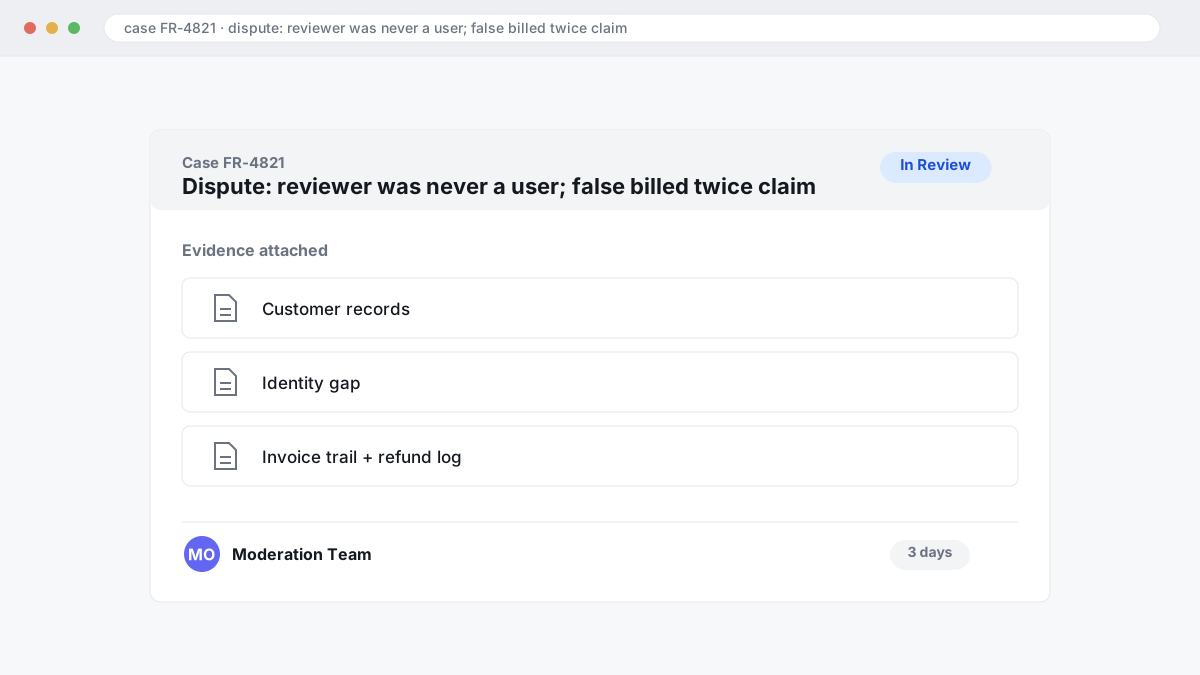
The wrong approach is arguing that a review is unfair, angry, or damaging to conversions. That usually fails because review moderation looks for a policy issue, not a wounded vendor. The right approach is narrower: show that the reviewer was never a user, that the account details do not match your user records, or that a statement of fact is provably false, such as “we were billed twice” when your invoice trail and refund log show otherwise.
Evidence packs work best when they read like an audit file rather than a complaint email. Include invoice numbers, contract dates, user or licence records, support-ticket history, screenshots of the claimed event, and one clean timeline tying each item to the disputed sentence. In BGR Review’s dataset of 12,000+ negative review cases logged June 2025 to June 2026, roughly 90% of businesses that came to us after a failed first attempt had used only the basic in-platform report button, with no supporting documentation, and 70–80% of those initial requests had been rejected.
Country and platform rules change the route. A fake review may fit platform rules on impersonation or inauthentic content; a defamatory review usually turns on false statements of fact, and the legal standard differs by country. In the US, undisclosed paid endorsements can trigger FTC rules; in the UK, fake reviews sit inside consumer-protection enforcement under the DMCC Act framework. This is general information, not legal advice.
What should you do in the first 48 hours after a bad Capterra review lands?
Document the review first, then decide whether you are dealing with service recovery, policy enforcement, or both. That first 48-hour triage window protects evidence, sharpens your response, and stops you filing a weak report that review moderation can dismiss.
The wrong move is the instant emotional reply. It usually concedes facts you have not checked, alerts a fake or defamatory reviewer that you are rattled, and leaves you without the account history Capterra may later ask for. Save full-page screenshots, the reviewer name, date, product tier mentioned, any claimed support tickets, and your internal CRM or billing record straight away. Across 12,000+ negative review cases logged by BGR Review from June 2025 to June 2026, reviews raised within 28 days of posting and backed by an identifiable policy issue resolved successfully in roughly 90% of cases; for comparable cases raised later, observed success fell to approximately 25–30%.
The right move is route selection. If the complaint matches a real customer and a real service failure, post a calm public response and try private outreach first because that can protect lead quality even when the review stays live. If the reviewer cannot be matched to any account, product access, invoice or support trail, prepare a formal flag with the missing-match evidence instead of arguing in public. Those are different jobs, and mixing them weakens both.
If you already hit the basic report button with no documents, slow down and rebuild the file. In BGR Review's negative review cases with prior self-filed attempts from June 2025 to June 2026, roughly 90% had used only the in-platform report option, and 70–80% of those initial requests were rejected. A rejection does not prove the review is genuine. It usually means the evidence pack was thin.
What does a practical Capterra dispute workflow look like from flag to final outcome?
A workable dispute process starts by matching the review to a specific rule, not by arguing about tone. The submissions that move fastest in review moderation use a short timeline, customer-match checks, and only documents a moderator can verify quickly.
The wrong approach is the long emotional complaint: five paragraphs about unfairness, screenshots with no labels, and no clear policy match. That usually fails because a moderator cannot infer your allegation for you. Start with one named rule from the Gartner Digital Markets Review Guidelines, then state the breach in one line: fabricated user, no customer record, competitor posting, or a defamatory factual claim you can disprove. In BGR Review's dataset of 12,000+ negative review cases logged June 2025 to June 2026, roughly 90% of businesses that came to us after a failed self-filed attempt had used only the basic in-platform report button with minimal support, and 70-80% of those initial requests had been rejected.
The right approach is a compact evidence pack. Attach three things: a dated timeline of the transaction or lack of one, customer-match findings from your CRM or billing system, and one or two files that prove the mismatch without exposing unrelated customer data. For fake or defamatory reviews, the useful comparison is simple: “review says project started on 14 March; our records show no account, invoice, contract, support ticket, or user seat under that name or company”. That gives moderation something testable.
Track the submission date, the ticket reference, and each reply. Across BGR Review's 12,000+ negative review cases logged June 2025 to June 2026, reviews raised within 28 days and backed by an identifiable policy issue resolved successfully in roughly 90% of cases; beyond 28 days, observed success fell to approximately 25-30%. Escalate once, with new proof or a cleaner policy match. Re-sending the same complaint rarely changes the outcome.
Where to go from here
Run a profile-and-review audit before you spend more on Capterra listings, paid placements or a bigger review request push. Start with the inputs that change visibility and lead quality fastest: category fit on your vendor profile page, pricing clarity, review recency, verified-user mix, response quality, and whether old complaints are depressing click-through rate from shortlist views into demos or form fills.
Check your last 20 reviews by hand. Separate real product objections from weak or risky content: competitor posts, reviews from non-users, copied wording across accounts, and statements that can be tested against Capterra's moderation rules. If a dispute is worth filing, collect the evidence first, then match it to the policy before you touch the report button. That usually saves time.
The useful outcome is a short action list: what to fix on-page, which review invites to send first, what to leave alone, and which review links have a realistic removal case.