

Quick answer
No, you usually cannot delete a Google review left on your business profile. Google lets the reviewer delete or edit their own post from their account, but a business owner cannot remove it just because it is harsh or damaging. Removal usually happens only if the review breaches Google’s Prohibited and restricted content policy, fits a valid legal removal request, or gets overturned after an evidence-backed escalation. If you want specialist help, BGR Review handles removals on a pay-after-success basis at $449 per removed review link, with $0 upfront.
This page is written from live removal work, not recycled help-centre summaries. The pattern we keep seeing is simple: the first report often fails because the business uses only the in-profile Flag as inappropriate button, while the reopened case gets traction when the policy match, screenshot trail, reviewer history and transaction records are lined up in one evidence pack.
Across 12,000+ negative review cases logged by BGR Review from June 2025 to June 2026, outcomes were tracked as removal success, unresolved or unknown, and unconfirmed end states were kept as unknown rather than dressed up as failures. That matters if you are deciding what to do with disputed google reviews, because the useful question is not whether a review is unfair, but whether it cleanly matches a rule Google will actually enforce.
Can you actually delete a Google review, or only get it removed?
You cannot directly delete somebody else’s Google review from your business profile. In practice, reviewer-owned deletion stays with the person who posted it, while your route is to report the review for policy enforcement or use a legal removal route if it contains false factual claims.
Most guides get this wrong by implying there is a delete button inside your Google Business Profile dashboard. There is not. A profile owner can report a review, reply to it, and track the case, but the review itself sits under Google’s control and the reviewer’s account, not yours.
The wrong approach is hunting for admin access that does not exist, then assuming Google is blocking you unfairly. That fails because Google treats reviews as user-generated content attached to the reviewer’s account, so direct editing or deletion is reserved to the reviewer. The workable approach is removal by policy match: you identify a review that appears to breach Google’s named rules, report it, and let Google decide whether it stays published.
That distinction matters because “remove” and “delete” are different actions. The reviewer can delete their own post from their Google account. Your business usually asks Google to remove a review from public view after a policy review, which is why disputes live inside reporting and enforcement rather than normal Google Business Profile settings.
Across 12,000+ negative review cases logged by BGR Review between June 2025 and June 2026, roughly 90% of businesses that came to us after a failed self-filed attempt had used only the basic in-platform report button with no supporting documentation, and 70–80% of those initial requests had been rejected. A rejection does not prove the review is genuine. It usually means the case was framed too loosely for Google to act on.
Which Google reviews usually qualify for removal under Google’s rules?
Google usually removes reviews only when they fit a named rule in its Prohibited and restricted content policy, such as spam, off-topic content, conflicts of interest, or fake engagement. A harsh one-star opinion often stays live if it does not match a policy ground, even when it drags down your star rating and cuts map-pack click-through.
Most guides treat a bad review as a removable review. That fails because Google does not judge fairness first; it checks policy match first inside Google Business Profile. “Terrible service” is usually protected opinion, but a review from a competitor, an ex-employee using the wrong account, or a non-customer posting the same text across listings can qualify under conflict-of-interest or spam rules, which is where many fake reviews sit.
The right approach is to classify the review by rule before you report it. Off-topic content covers posts that talk about politics, another business, or a delivery platform dispute rather than your service; spam covers repeated text, link-stuffed posts, or coordinated bursts from newly created accounts; conflict-of-interest covers staff, owners, and competitors reviewing for gain; fake engagement covers bought or fabricated reviews that mislead users and can also raise FTC endorsement issues in the US and misleading commercial practice issues in the UK/EU.
Rejection often reflects weak framing, not a clean review. In BGR Review’s log of 12,000+ negative review cases from June 2025 to June 2026, roughly 90% of businesses who came to us after a failed self-filed attempt had used only the basic report button with no supporting documentation, and 70–80% of those initial requests had been rejected. That is why “unfair” rarely moves Google, while a tight policy match sometimes does.
How do you remove a Google review inside Google Business Profile step by step?
To try to get a Google review removed, open your Google Business Profile or the Google Maps app, find the review, tap or click Flag as inappropriate, choose the closest policy reason, and save the review link, date and screenshots for tracking.
The wrong approach is expecting that click to delete the review on the spot. It does not. Google treats this as a policy report inside Google Business Profile, then reviews it manually or through automated checks, and the review often stays live for several days while the case is assessed; harder cases can run longer. That delay matters because a live one-star post can keep hurting map pack click-through and call conversions while you wait.
The route changes slightly by device, but both paths end in the same reporting step. On desktop, open your Google Business Profile, go to reviews, pick the review and submit the report reason. In the Google Maps app workflow, open your business profile, find the review, use the three-dot menu and report it there. Save the case details yourself, because Google does not give you much context later if you need to reopen the issue.
This is where most DIY attempts break down. In BGR Review's log of 12,000+ negative review cases from June 2025 to June 2026, roughly 90% of businesses who came to us after failing had used only the in-platform report button with no supporting documentation, and 70-80% of those first requests had been rejected. The report button is the correct first move. Treating it as an instant takedown request is what fails.
| Route | Where you start | What you do |
|---|---|---|
| Desktop | Google Business Profile | Open reviews, select the review, submit Flag as inappropriate |
| Mobile | Google Maps app workflow | Open your profile, find the review, use the menu to report the policy issue |
What evidence gives a Google review report the best chance of being reopened?
The best reopening requests tie one named clause in Google’s Prohibited and restricted content policy to hard proof: screenshots, order or booking records, staff timeline notes, and a short explanation showing the reviewer was never a customer or the content is prohibited. For fake reviews, one clean policy match carries more weight than a long complaint about how unfair the post feels.
The weak approach is emotional. Owners often write that the review is “obviously fake”, “damaging our reputation”, or “hurting our star rating” and stop there; Google’s form gives that very little to act on unless you connect the review to a rule such as spam, impersonation, off-topic content, conflict of interest, or deceptive engagement. In BGR Review’s dataset of negative review cases with prior self-filed attempts, logged June 2025 to June 2026, roughly 90% of businesses coming to us after a failed attempt had used only the basic in-platform report button with no supporting documentation, and 70–80% of those initial requests had been rejected.
The stronger approach is an evidence pack built like a simple case file. Include a screenshot of the review and profile URL, the date and time it appeared, booking records or order logs showing no matching customer, staff notes showing who handled that shift, and any account clues that support a fake-review argument, such as copied wording across locations or a reviewer naming a service you do not offer. Keep the explanation tight: cite one policy clause, attach proof for that clause, and leave out the emotion. That is what gives a rejected report the best chance of being reopened rather than dismissed as a repeat complaint.
What should your Google review removal request actually say?
Your removal request should open by naming one rule from Google Business Profile’s Prohibited and restricted content policy, then pin the report to the exact review URL, posting date, profile name and 2-3 proof items from your evidence pack.
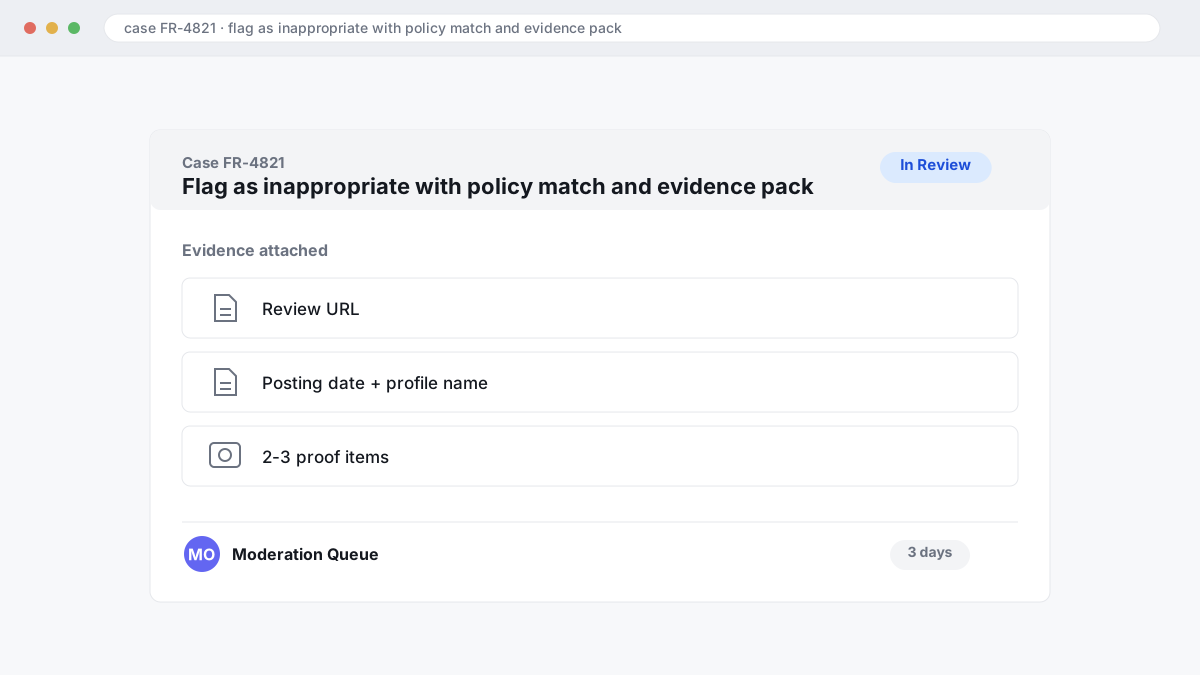
Generic complaint text fails because it reads like frustration, not a policy match: “This is fake and damaging, remove it now” gives Google almost nothing to assess after you hit Flag as inappropriate. In BGR Review’s dataset of negative review cases with prior self-filed attempts, logged June 2025 to June 2026, roughly 90% arrived with only the basic in-platform report and no supporting documentation; in that group, 70-80% of initial requests had been rejected.
“I am reporting this review under Google’s Prohibited and restricted content policy on deceptive content / conflict of interest / off-topic content [choose one]. Review URL: [paste URL]. Date posted: [date]. Business profile: [full GBP name]. Attached evidence: [invoice or CRM lookup showing no matching customer], [screenshot proving duplicate or copied text], [staff timeline or call log showing the claimed visit did not occur]. Please review against this policy ground.”
Keep the tone flat. Threats, insults and unsupported defamation claims usually weaken the request; dated, attached proof gives Google something it can verify.
What can you do if Google rejects your report the first time?
If Google rejects your first report, your best move is usually a tighter second submission, not a repeat click on Flag as inappropriate. Sharpen the policy match, add the missing proof, keep your screenshots, and send the re-review through support with the original case ID attached within a few days.
Most first-round rejections happen because the report sounds upset but does not map cleanly to Google’s Prohibited and restricted content policy. In BGR Review’s dataset of negative review cases with prior self-filed attempts, logged June 2025 to June 2026, roughly 90% had used only the basic in-platform report button and no supporting documentation; in that group, 70–80% of initial requests had been rejected. That matters because a rejection often reflects a weak policy match, not a clean bill of health for the review.
The wrong approach is resubmitting the same complaint with harsher wording. Google usually treats that as the same unsupported allegation, so nothing changes for your star rating, map pack click-through, or the conversions that fall when a bad review keeps sitting at the top. The right approach is appeal escalation: reopen the case with new proof, reference the first case number, and show exactly what rule the review breaks.
Your revised evidence pack should add what the first report lacked: screenshot of the live review, profile URL, timestamps, order or booking records showing no customer match, and any image theft or impersonation proof. File that through Google Business Profile support first, then request re-review, and if support stalls, escalate in the Google Business Profile community forum with the case details already attached. Move fast: in BGR Review’s case file of 12,000+ negative review cases logged June 2025 to June 2026, reviews raised within 28 days and backed by an identifiable policy issue resolved successfully in roughly 90% of cases, versus approximately 25–30% for comparable cases raised later.
When does a legal removal request make sense instead of ordinary flagging?
A legal removal request makes sense when a review alleges false facts, impersonates a customer, or conceals paid influence behind what looks like a genuine opinion. The rules change by country and by platform, and this is general information rather than legal advice.
Most guides push every bad review through ordinary flagging. That fails when your dispute is legal rather than policy-based. A one-star opinion like “slow service” usually stays up, because Google treats that as the reviewer’s view; a statement like “this clinic forged my test results” is different, because it asserts a verifiable fact and may fit defamation analysis or a formal Legal removal request. The same split applies to hidden incentivisation: if a post was paid for and not disclosed, the issue moves closer to the FTC endorsement guides in the US, or to UK/EU misleading commercial practice rules on fake or manipulated consumer reviews.
The workable route is to match the claim to the right mechanism. If the review breaches Google’s Prohibited and restricted content policy, use normal flagging first inside Google Business Profile; if it alleges a false event, false transaction, fake identity or undisclosed paid promotion, prepare documents and use Google’s legal form with the exact statement, why it is false, and what evidence proves that. In BGR Review’s removal work, billed only after success at $449 per removed review link with $0 upfront, legal-style cases live or die on documents, not outrage: invoices, booking records, staff logs, screenshots of the reviewer asking for payment, or proof that no customer relationship existed at all.
Country scope matters. US readers usually end up weighing platform policy, defamation standards and the FTC’s endorsement rules together; UK and EU readers may also need to consider consumer-protection rules on misleading commercial practices around fake reviews and hidden incentives. If you are unsure which route fits, get legal advice before filing, because a weak legal claim rarely fixes a rejected report and can slow the cleaner policy route.
Should you handle review removal yourself or hire a removal service?
DIY review removal gives you control and a lower cash outlay. A managed service usually saves owner time and improves the quality of the evidence and escalation work, but you pay for that tighter process.
The wrong DIY approach is to open your Google Business Profile, hit Flag as inappropriate, and assume Google will infer the problem. That fails because the first report often carries almost no context. Across 12,000+ negative review cases logged by BGR Review from June 2025 to June 2026, roughly 90% of businesses who came to us after a failed attempt had used only the basic in-platform report button, and 70–80% of those initial requests had been rejected.
The better DIY route works if you have time to do three things properly: match the review to Google’s Prohibited and restricted content policy, build an evidence pack, and reframe the issue during appeal escalation if the first report is denied. For a single fake review on one listing, that can be the right call. You keep full control of your Google Business Profile and spend time instead of money.
A managed service makes sense when the review is costing calls, bookings, or form fills and you do not want to learn the policy language yourself. The practical gain is structure: cleaner evidence packs, tighter wording, and a more disciplined escalation path after rejection.
| Route | What you spend | What you carry |
|---|---|---|
| DIY | Lower cash cost | Your time, policy reading, evidence pack, follow-up |
| Managed | Service fee if terms are met | Less owner admin, more structured escalation |
No legitimate service can promise Google removal in every case. Google decides the outcome, and any agency claiming guaranteed deletion of all reviews is selling certainty it does not control.
What changes first when you fix a damaging Google review problem?
The first change after a damaging review is removed is usually better trust on your Google Business Profile, stronger click confidence in the map pack, and cleaner lead quality; ranking movement, if any, tends to lag behind those conversion signals.
Most guides sell the ranking miracle. That fails because Google does not recalculate local visibility from one review event in isolation; distance, relevance, profile completeness and review depth still matter. The right priority is the conversion layer: your average score, the review snippet a searcher sees first, and whether the newest comment makes you look risky before they call or submit a form. Star rating impact shows fastest when the removed review was recent, sat near the top, and pulled a low-count profile from, say, 5 reviews to 4 or 6 reviews to 5.
A one-star swing hits harder on thin profiles than on mature ones. Losing or removing a single one-star review can materially change perceived trust when you have 8 reviews; the same change on a profile with 500 reviews is usually diluted, though it can still lift click-through if the removed post was prominent. In BGR Review’s dataset of trades businesses with complete enquiry-source data, observed February to July 2026, 70–80% of calls and bookings came through a Google Business Profile or Yelp listing rather than a website, which is why the first payoff is usually better calls, bookings and form fills before any visible ranking jump.
What should you do right after a review is removed?
Once Google removes a review, check that it has vanished in both Search and the Google Maps app, save screenshots of each view, and then use the next 30-60 days to rebuild the profile with compliant new feedback and quicker owner replies. Treat removal as the start of recovery, not the finish.
The wrong move is to stop the moment the bad post disappears. That fails because the star rating impact can linger in buyer behaviour even after the listing looks cleaner, especially if your latest visible reviews are old, unanswered, or clustered around the same complaint.
The right move is to close the gap with fresh, policy-compliant reviews over the next 30-60 days, then fix the reason the profile looked weak in the first place. Check your reply rate, look for service issues that triggered the complaint, and tighten review request timing so asks go out right after a completed job or resolved support interaction, not weeks later when sentiment has cooled. If you buy a review package, keep the 30-day free replacement guarantee in mind, but the stronger gain usually comes from better timing and better replies because that improves map-pack click-through and conversions, not just the visible average.
What does a practical Google review removal workflow look like from first flag to outcome?
A workable Google review removal process is linear: capture the review, match it to one rule, file the report, track the case, then escalate only with stronger proof. Most failed attempts break down before submission because the owner never builds an evidence pack or ties the complaint to Google’s Prohibited and restricted content policy.
On day 1, screenshot the full review, reviewer name, date, star rating, your Google Business Profile name, the review URL, and anything that may disappear later such as edits or profile changes. Then force a policy match. “Fake” is too loose on its own; you need the closest rule and the proof beside it, whether that is off-topic content, conflict of interest, impersonation, harassment, or a factual mismatch with your booking, CRM, call log or staff rota.
Days 2–7 are for one clean submission through Flag as inappropriate, plus a dated log of what you sent and any status changes. Random repeated flagging usually fails because it resubmits the same weak complaint; in BGR Review’s dataset of 12,000+ negative review cases logged June 2025–June 2026, roughly 90% of businesses who came to us after a failed attempt had used only the basic in-platform report button with no supporting documentation, and 70–80% of those initial requests had been rejected. Monitoring matters because a silent rejection changes what you do next.
If Google rejects the first report, appeal escalation works best when you tighten the proof instead of rewriting the same argument. Add the missing document, reduce the complaint to one policy breach, and show why the review text conflicts with your records. In the same BGR Review case file, reviews raised within 28 days and supported by an identifiable policy issue resolved successfully in roughly 90% of cases, while comparable cases raised beyond 28 days fell to approximately 25–30% from June 2025 to June 2026.
Where to go from here
Check the review against Google’s Prohibited and restricted content policy before you do anything else. If you can point to impersonation, conflict of interest, off-topic content, harassment, or another named policy breach, build the evidence pack first: screenshots, order or booking records, staff notes, profile details, and anything that shows the reviewer was never a real customer. Then use Flag as inappropriate, track the case, and be ready to reframe the report on escalation if Google rejects the first pass.
If the review is genuine, or you cannot tie it to a policy violation, stop chasing deletion. Write a calm public reply, fix the issue if it is real, and shift effort into review acquisition so one damaging post does not keep dragging your star rating, map-pack click-through rate, and conversions down. That is usually the cheaper move.
Your next step is simple: classify the review today as removable or non-removable. That decision tells you whether to prepare evidence for a policy report or start repairing the profile with replies and fresh verified feedback.