


Quick answer
Schema markup is structured data you add to a page so Google, Schema.org-based parsers and AI search systems can identify the entity, attributes and page intent with less guesswork. For most sites, start with JSON-LD, which Google recommends for many structured data features, and ship Organisation or LocalBusiness first. Add Product, Review, FAQ or Article markup only where the visible content already supports those fields and Google's review snippet guidelines allow it. Validate every release in Google Rich Results Test and then check Search Console enhancements. Most failures come from missing required fields, content parity gaps or choosing the wrong schema type.
We wrote this the way we handle live reputation and visibility work at BGR Review: pick one template, deploy it on a small page set, test the rendered JSON-LD, then watch Search Console for fresh warnings before expanding. The mistakes usually appear after launch, not before — a logo URL blocked in robots.txt, a sameAs link pointing to the wrong profile, or review markup added to a page that only shows an aggregate score.
BGR Review has served 15,000+ businesses and works from New York, London and Thornhill, but the useful part here is the process detail. If your schema markup does not match the page exactly, AI extraction gets messy, branded search suffers, and the pages that should drive calls, bookings and form fills rarely earn the trust signals you expected.
Which schema should you ship first if you want visible SEO impact fastest?
Ship the markup tied to your highest-value pages and Google-supported features first. For most sites, that means Organisation schema plus page-level markup on revenue pages, because clean eligibility and clear entity signals beat broad coverage every time.
Most guides tell you to mark up everything in the Schema.org vocabulary as early as possible. That fails because a site can publish 20 valid types and still leave Google unclear about who the business is, which page represents the main entity, and which locations actually earn calls, bookings and form fills. You end up with code on low-value pages while your core location pages still have weak entity disambiguation, mixed business names, or missing same-business signals between the site and the profile that drives map-pack clicks.
Local businesses usually get the fastest visible SEO lift by starting with Organisation schema on the site-wide layer and LocalBusiness on core location pages. That gives Google and AI systems a stable business identity first: legal or trading name, primary URL, logo, contact details, and location-specific details on the pages that influence local pack visibility and conversions. In BGR Review’s dataset of 1,485 businesses observed from February to July 2026, trades businesses with complete enquiry-source data attributed 70–80% of calls and bookings to a Google Business Profile or Yelp listing rather than a website, which is exactly why location-page clarity matters before decorative markup does.
Product, Article and FAQ markup usually come later. They matter once your core business entity is clean, your on-page content matches the markup, and your revenue pages are already eligible for the features you actually want. Start small, on a few core pages, then expand.
Why does schema matter to AI search even when rich results never appear?
Schema helps machines decide who and what a page represents even when Google shows no visible enhancement in search. Clear entities, stable properties and well-chosen sameAs links increase extraction confidence for AI systems that summarise brands, people, products and locations from the page itself.
Most guides treat schema markup as a way to win stars, FAQs or other SERP decoration. That approach fails the moment no rich result is triggered, because the machine still has to resolve whether your brand name refers to your company, a common word, or a similarly named competitor. Organisation schema gives that machine-readable anchor: legal name, website, logo, contact points and profiles that connect the same entity across service pages, author pages and location pages. For BGR Review, which sells verified review services across Google, Trustpilot, Yelp, Clutch and TripAdvisor, that matters because AI search can mention your brand long before a reader reaches your homepage.
If your name overlaps with another business, entity disambiguation becomes the real job. sameAs links help by pointing to consistent external references such as your Google Business Profile, LinkedIn page or Crunchbase entry, which reduces ambiguity when names are shared or generic. Google’s Search Central documentation on structured data and Schema.org’s vocabulary both support this machine-readable consistency; the gain is cleaner brand extraction, steadier map-pack association for location queries, and better click-through when AI answers cite the right business instead of blending you into someone else.
How do you add schema markup without creating a maintenance mess?
The lowest-risk workflow is to pick one page type, write JSON-LD from the visible page copy, publish it through your CMS or a script tag, then test syntax and eligibility before you scale anything across templates.
The messy approach is pasting a generator output onto every page first and asking questions later. That fails because the code starts describing content the page does not actually show, which breaks content parity and leaves you updating dozens of templates every time a heading, phone number or offer changes. If you sell reviews or removal services, as BGR Review does, this matters fast: a page cannot safely mark up ratings, prices or service details that are absent, outdated or phrased differently from the visible page.
Map the page’s single job before you write any properties. A contact page usually needs one primary type from the Schema.org vocabulary, such as Organisation or LocalBusiness; a product page needs Product; an article needs Article. Choose that primary type first, then add only the properties your page can support in plain sight.
Use JSON-LD because it is easier to maintain than inline microdata and usually cleaner for developers to audit after the next deployment. Place the script in the head or body, keep values pulled from the same source as the page content where possible, publish, test, then re-check after the next crawl or release. If your page mentions reviews supplied through a BGR Review package with a 30-day free replacement guarantee, the markup still has to match the reviews and rating details actually rendered on that page, not what sits in a spreadsheet or sales brief.
When should you choose JSON-LD over microdata for schema markup?
Choose JSON-LD unless your CMS already outputs reliable Microdata from locked templates. It is faster to ship, easier to debug, and less likely to break when an editor changes visible page elements after launch.
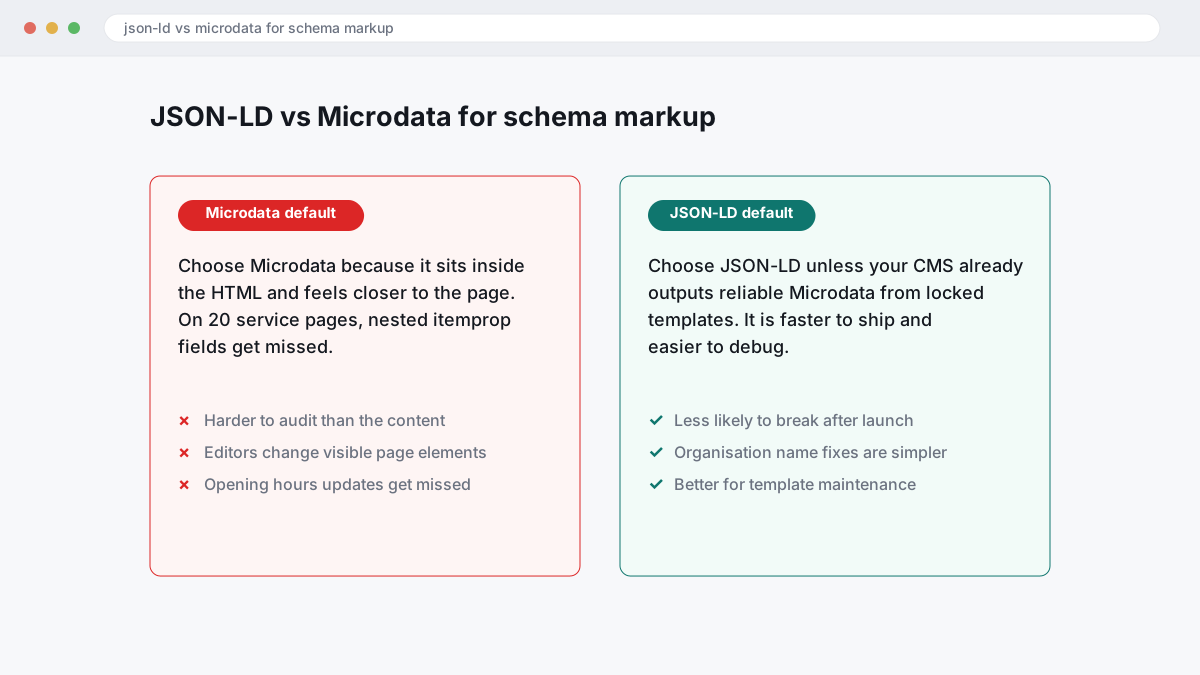
Most guides treat Microdata as the safer choice because it sits inside the HTML and feels closer to the page. That logic fails once you have to maintain 20 service pages, update opening hours, or correct an organisation name across templates: nested itemprop fields get missed, and the markup becomes harder to audit than the content itself. As of 2026, Google guidelines and Google Search Central examples generally show structured data in JSON-LD first, which tells you where Google expects most implementations to go.
JSON-LD works better for operational reasons. You can keep the Schema.org vocabulary in one block, compare it against the live page, and spot parity issues quickly without hunting through headings, links, and image tags. That matters if you are also managing review visibility and branded search demand, because stale business data weakens entity consistency and can blunt click-through rate from the local pack even when rankings hold.
Microdata still has a place. If your platform already injects clean Product or Article properties at template level and nobody edits those fields manually, leave it alone; but for Organisation, LocalBusiness, FAQ, and other nested markup you need to audit at scale, JSON-LD is usually the cleaner choice.
Which properties must match the page exactly before Google will trust the markup?
Structured data works when each key property is visible on the page, accurate, and specific to that URL. If your markup says one thing and the page says another, Google can drop eligibility and treat the code as less trustworthy under its structured data and spam guidelines.
The wrong approach is using the Schema.org vocabulary to fill gaps in weak page copy. A service page that hides the full business name, shows an old address, omits opening hours, or lists “from” pricing in code while the page shows no price creates a content parity problem. Google’s guidelines are plain on this point: structured data should match the main content users can see. If your page says BGR Review charges $449 per removed review link with $0 upfront, the markup can repeat that. If the price is absent on-page, the code should not invent it.
Hidden review stars and made-up authorship create a bigger risk. Marking up reviews that are not visible, or adding an Article author who is nowhere on the page, gives Google a clean reason to ignore the markup and invite manual scrutiny. The safer route is boring but effective: match the exact business name, address, hours, and product price shown on-page, then publish markup only after the visible copy is final. That is how you keep entity signals consistent and avoid guideline friction later.
What does a copyable JSON-LD setup look like for common business pages?
A workable setup is a small JSON-LD block matched to the page in front of the reader, not one oversized blob pasted across the whole site. Start with a clean Organisation schema on the sitewide brand layer, an Article schema block on editorial URLs, and a Product schema block only on pages that visibly show an offer.
Most guides push one master template for every page. That fails because AI extraction and Google parsing depend on page intent, content parity, and entity disambiguation: an about page, a blog post, and a pricing page are different documents. We keep deployments cleaner for BGR Review clients by matching the schema to the visible page asset, then expanding after validation rather than stuffing every possible property into one block.
Use this Organisation schema on your homepage or about page, and keep the sameAs links limited to profiles you actually control, such as Google, Trustpilot, Yelp, Clutch, or TripAdvisor if those are the review platforms you use in live reputation work.
{
"@context":"https://schema.org",
"@type":"Organization",
"name":"Your Business Name",
"url":"https://www.example.com/",
"logo":"https://www.example.com/logo.png",
"sameAs":[
"https://www.google.com/maps?cid=YOURCID",
"https://www.trustpilot.com/review/example.com"
]
}
Use Article schema on editorial pages where the headline, author, and publication date are visible on the page. That helps AI systems connect your article to a named publisher and a dated source, which matters more than chasing a rich result that may never show.
{
"@context":"https://schema.org",
"@type":"Article",
"headline":"Schema Markup for AI Search: a Practical 2026 Guide",
"author":{"@type":"Person","name":"Author Name"},
"datePublished":"2026-08-13"
}
Use Product schema only where the page already shows offers, price, and availability. A removals page that visibly states BGR Review’s $449 per removed review link and $0 upfront is a fair example; a vague service page with no price is not.
{
"@context":"https://schema.org",
"@type":"Product",
"name":"Negative Review Removal",
"offers":{
"@type":"Offer",
"price":"449",
"priceCurrency":"USD",
"availability":"https://schema.org/InStock"
}
}
How should multi-location businesses structure LocalBusiness schema without creating duplicate entities?
Multi-location brands should publish one Organisation schema entity for the parent company and one LocalBusiness schema entity on each location page. Repeating the same NAP, page URL or opening hours across every branch blurs location signals and makes entity disambiguation harder for Google and AI search systems.
Most guides still suggest one global LocalBusiness block listing every branch. That fails because Google has to reconcile one entity with several addresses, several phone numbers and several landing pages, while your local pack candidates are branch-level pages, not a corporate summary. The cleaner build is simple: keep the head office, brand name, logo and sameAs links in Organisation markup on the main site, then mark up each branch page with its own legal trading name where relevant, branch phone, street address, map coordinates, opening hours and canonical URL.
NAP consistency matters most at the branch level. If your Manchester page uses the London switchboard, or every clinic page repeats headquarters opening hours, the code is technically valid but operationally weak because the page content, Google Business Profile and structured data are describing different real-world entities. That mismatch can suppress map-pack confidence, reduce click-through rate on branded local searches and send weaker trust signals into AI answer generation.
This is the rollout we use on location builds before wider deployment: mark up 3 to 5 branch pages first, validate each one, then check that the on-page footer, contact block and Google Business Profile all match the LocalBusiness fields exactly. Expand only after the entity names, addresses and page targets stay consistent in Search Console and no branch starts inheriting another branch’s details.
| Setup | What Google sees | Likely outcome |
|---|---|---|
| One LocalBusiness block for all branches | One mixed entity with several addresses and URLs | Weak entity disambiguation, weaker local pack relevance |
| One Organisation entity plus one branch entity per page | Clear parent brand and clear branch-level entities | Stronger location matching, cleaner conversions on local landing pages |
Where do review, FAQ, and merchant markup usually cross Google’s line?
Review, FAQ and merchant markup carry the most compliance risk because people push them for visibility before checking whether the page actually qualifies. Valid code alone does nothing here; Google ties eligibility to page purpose, visible content and the specific rules behind each feature.
The common mistake with reviews is adding aggregateRating or a review snippet to your own local business page and expecting stars to appear. Google’s Review snippet guidelines restrict self-serving review markup on many LocalBusiness and Organisation pages, so the code can validate and still stay ineligible. The safer route is simple: keep third-party review evidence visible on the page for trust and conversions, but reserve review markup for pages and content types Google actually allows. That matters for AI extraction as well, because unsupported stars on a service page weaken entity trust instead of lifting click-through rate or map-pack visibility.
FAQ schema crosses the line when the page does not show the exact same questions and answers a crawler reads in JSON-LD. If your page has one short answer and the markup expands it into sales copy, Google can ignore the enhancement and treat the page as inconsistent. Use FAQ markup only where the visible copy matches line for line.
Merchant listings fail for a different reason: Product schema without real offers data is empty markup. If you want product-based eligibility, your merchant listings need a genuine price, availability and landing-page match, not “call for price”, placeholder stock text or product code copied onto a service page.
Can schema markup hurt rankings or trust if the code is technically valid?
Yes. Schema can hurt performance indirectly when it misstates the page, breaks feature rules, or weakens trust in your site’s data. A validator can return green and your markup can still be ineligible, manually reviewed, or ignored because the problem is the claim, not the syntax.
The wrong approach is shipping technically valid markup that says more than the page proves. A common example is aggregateRating on a service page that shows no visible rating, fake availability on a product that cannot actually be bought, or review markup attached to testimonials that fail Google’s review snippet guidelines. That fails because Google checks content parity: the structured data, the visible page copy, and the actual offer need to describe the same thing. If they do not, you risk losing rich-result eligibility first, then trust in the wider entity data that feeds AI extraction, branded search visibility and click-through from the map pack.
The safer approach is boring on purpose. Mark up only what the reader can verify on the page, keep ratings tied to real first-party review displays, and remove properties the page cannot support today. Disclosure rules still sit above valid code: in the US, the FTC endorsement guides apply to incentivised or paid endorsements, and UK/EU consumer-protection rules apply to misleading commercial claims. BGR Review sells review services openly, but that does not override platform rules or disclosure law, and this is general information rather than legal advice.
How do you test whether schema is eligible, indexed, and still working after launch?
Test three separate things after deployment: code validity, rich-result eligibility, and whether the markup keeps working once Google recrawls the page. The Google Rich Results Test catches immediate parse and eligibility issues, while Search Console enhancements tells you later whether Google has started reporting warnings, lost an enhancement, or stopped recognising the item type.
Publish-once-and-forget is the wrong approach because a clean JSON-LD block in staging can still fail on the live URL. A cached template, a minifier, or a JavaScript rendering fix can strip fields, duplicate nodes, or change content parity between the visible page and the markup. The safer workflow is simple: run the Google Rich Results Test on the pre-release build, push the page, then run it again on the live URL that Google can fetch. On BGR Review service pages, that second check is where hidden problems usually show up, especially when a CMS plugin rewrites head scripts after publish.
If the test passes, wait for the next recrawl and check Search Console enhancements rather than assuming eligibility means indexing. Enhancement reports often surface warnings only after Google processes the live page, and that is the point where an Organisation, Product, or FAQ item can drop out even though the syntax still validates. Search Console also helps you spot template-level damage fast: one warning across ten URLs is a page issue, the same warning across a directory is usually a theme or plugin issue.
Re-test after every CMS update, schema plugin change, or JavaScript rendering adjustment. That sounds basic, but it prevents the common failure where a developer fixes Core Web Vitals, moves scripts, and accidentally breaks structured data across your money pages, which then cuts rich-result eligibility, weakens click-through rate, and makes AI extraction less consistent on branded search and local pack queries.
What does a practical schema monitoring workflow look like once markup is live?
A workable monitoring routine stays simple: log every schema deployment, test representative URLs, review Search Console weekly, and investigate any warning spike before it rolls across a template set. If you only watch rankings, you will miss the real failure point: the markup state changed, Google stopped reading a field, or one template update broke hundreds of URLs at once.
This is the sheet structure we use before expanding any rollout beyond a small page set.
| Track | Why it matters | What to record |
|---|---|---|
| Template change | Explains sudden warning spikes | Date, template name, field changed, who deployed it |
| Crawl and test state | Shows whether Google saw the new JSON-LD | Last crawl date, Google Rich Results Test result, rendered HTML check |
| Report health | Stops one issue spreading unnoticed | Search Console enhancements warning type and affected URLs |
Most guides stop at “monitor performance”. That fails because rankings move for too many other reasons, while Search Console enhancements will usually show the cleaner signal first: invalid item count up, valid item count down, or one warning attached to a specific template. After any major deployment, review those reports weekly for four weeks and note affected URLs in the same sheet so you can tie the warning to the exact release.
If JavaScript injects JSON-LD after load, spot-check rendered HTML, not just source code. A page can look fine in your CMS and still ship no usable markup to Googlebot because the script fires late, fails on one template, or drops properties on mobile. That is the point where a small rollback is cheaper than letting broken Organisation, Product, or FAQ markup sit live until sales pages lose eligibility and your branded search clicks convert worse than they should.
Where to go from here
Start with a live-page audit, not a plugin install. Check your homepage, top service pages, location pages and product pages for content you can actually support with structured data, then pick the first schema type by commercial impact: Organisation for brand/entity clarity, LocalBusiness for map-pack and call intent, Product for merchant listings, or Article for editorial pages. Deploy it on a small page set first. Then run Google Rich Results Test, check Schema.org property coverage, and watch Search Console enhancements for warnings before you expand.
If review visibility affects click-through rate, calls, bookings or branded search demand, keep the markup aligned with your wider reputation work. Review markup fails when the page copy, ratings shown, and source of the reviews do not match Google's review snippet guidelines. Content parity matters more than volume.
Expect the first rollout to surface gaps you missed: inconsistent business names, weak sameAs links, missing publisher details, or location pages that blur entity disambiguation. That is normal.